Minn Admin renders third-party plugin data through surfaces: declarative descriptors registered from PHP. One filter, no JavaScript, no build step. Most plugin admin screens are one of three shapes (a list, a detail view of one item, a few stat numbers), and Minn draws all three with the same list / tabs / detail-modal / action primitives that power its built-in views.
Quick start
add_filter( 'minn_admin_surfaces', function ( $surfaces ) {
    $surfaces['my-plugin'] = array(
        'label'      => 'Submissions',          // sidebar + page title
        'sub'        => 'My Plugin',            // small badge next to the title
        'icon'       => 'inbox',                // one of Minn's icon names
        'cap'        => 'manage_options',       // checked server-side before the surface is exposed
        'collection' => array(
            'route'     => 'my-plugin/v1/submissions',   // any REST route, called with cookie + nonce
            'pageQuery' => 'per_page=25&page={page}',    // {page} is filled in by Minn
            'itemsKey'  => 'items',   // key of the item array in the response (omit if the response IS the array)
            'totalKey'  => 'total',   // key of the total count (omit to use the X-WP-Total header)
            'columns'   => array(
                array( 'key' => 'title',  'label' => 'Title',  'format' => 'title' ),
                array( 'key' => 'email',  'label' => 'Email' ),
                array( 'key' => 'status', 'label' => 'Status', 'format' => 'pill' ),
                array( 'key' => 'date',   'label' => 'Date',   'format' => 'ago' ),
            ),
        ),
    );
    return $surfaces;
} );
That's a working, paginated, capability-gated view in the Minn sidebar.
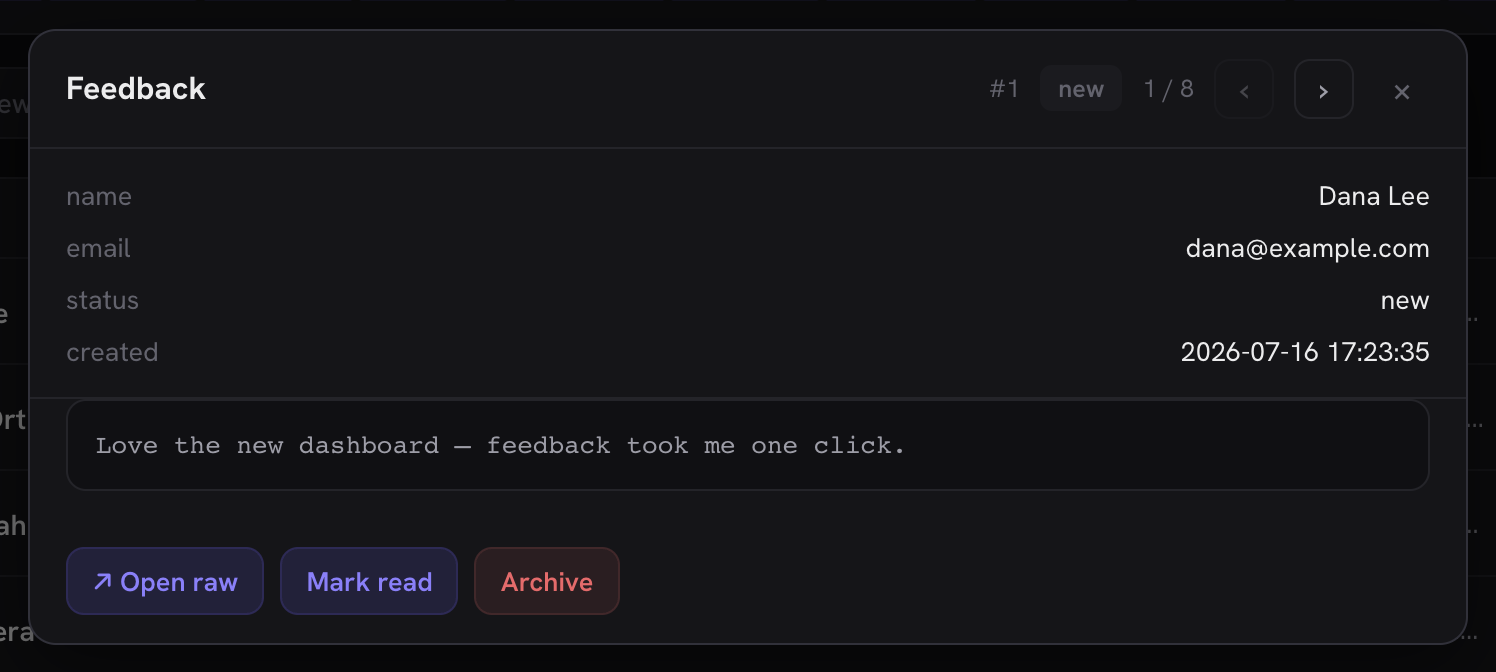
Your data lives in a custom table with no REST route? That's the majority case, and it has its own start-to-finish walkthrough: the shim tutorial, which builds a small REST shim plus this descriptor for a fictional plugin. The finished code ships as a real, working plugin you can copy (docs/examples/minn-example-adapter/), and Minn's own test suite drives it end to end, so the example can never drift from the contract. This is what that tutorial's finished surface looks like, built entirely from declarative keys documented on this page:
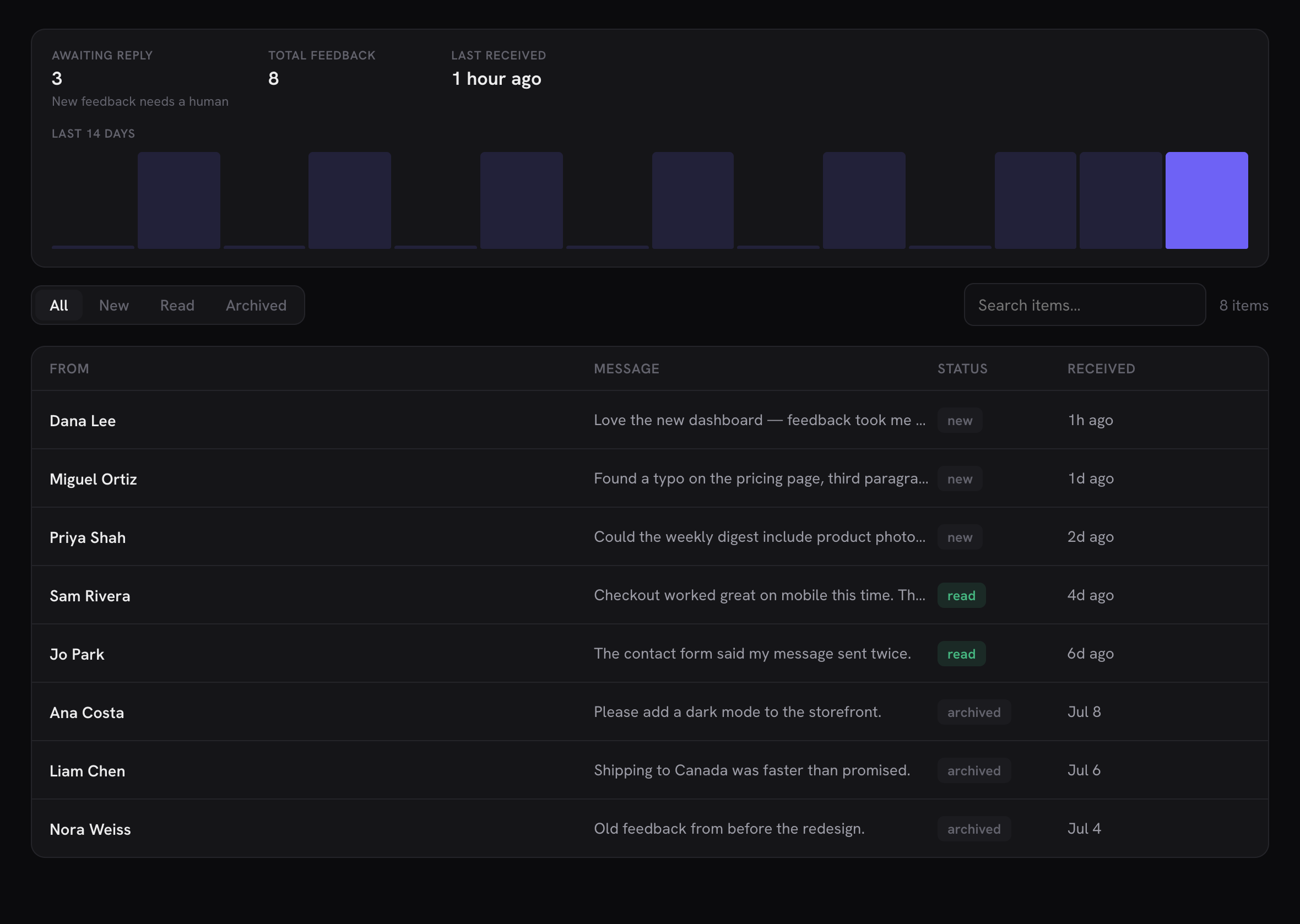
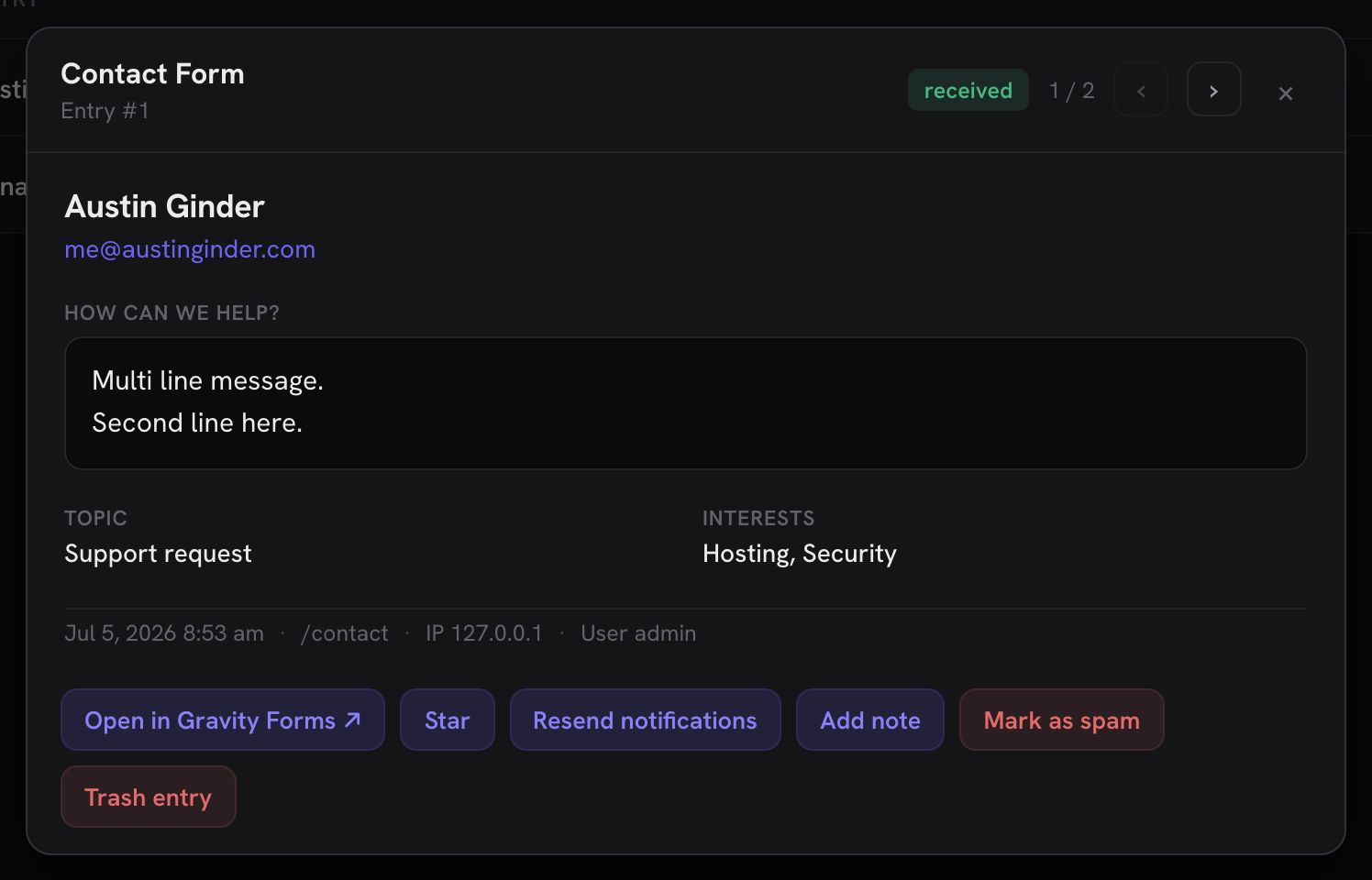
Building a forms plugin? After the tutorial, the first-class Forms provider recipe covers the forms-specific machinery: per-form tabs, entry-summary columns, the contact-card entry detail, the Entries/Forms switcher and the forms family.
Test your integration
- The Integrations card is your build-time debugger. Open Minn's System page (
/minn-admin/system) and find Integrations: it lists every registered surface, editor panel, design source, cache purger, page builder and hook listener, attributes each to the plugin that registered it, and flags contract problems (unknown keys, missing routes, columns without keys). A descriptor the app quietly can't render explains itself there, and the card's copy-report carries the section for bug reports. - Try it in a disposable WordPress. Minn's readme has a one-click WordPress Playground badge that boots a demo site with Minn installed: upload your plugin zip there and your surface is testable without touching a real site. The boot also preactivates the shim tutorial's example plugin (the Feedback surface, seeded with demo rows), so a working instance of this API is one click away before you write anything.
- Test as a non-admin. Your descriptor's
caphides the surface from users without it, but your routes'permission_callbackis the real boundary: log in as an editor or author and confirm both layers agree.
Ship the adapter inside your own plugin
Put your add_filter() / add_action() calls in one file inside your plugin and require it unconditionally:
my-plugin/
└── includes/minn-admin.php   ← all your minn_admin_* filters live here
No class_exists( 'Minn_Admin' ) guard is needed: when Minn isn't installed the filters are simply never applied, so the integration is a free no-op. Users who install both plugins get the integration automatically: nothing to configure, no companion plugin to ship.
Minn bundles adapters (in includes/adapters/) only for popular plugins that don't know about Minn: Gravity Forms, ACF, Redirection, the analytics providers. If you're the author of the plugin being integrated, ship the adapter with it instead; Anchor Blocks does exactly this in app/MinnAdmin.php.
Label and description strings in descriptors are yours: run them through __() in your own text domain if your plugin is translated. Minn renders them verbatim (escaped, never parsed).
Building with an AI agent
The descriptor contract suits agentic coding unusually well: it is declarative, validated live, and verifiable in a browser. If you're wiring your plugin in with an AI coding tool, hand it three things (this document, the shim tutorial, and the example plugin) and tell it to verify against the Integrations card (/minn-admin/system) when it thinks it's done. The example plugin doubles as a known-good reference the agent can diff its work against.
Compatibility
The hooks in the hook reference below, and the descriptor keys documented on this page, are Minn's integration contract. The intent is that it changes rarely, and additively:
- New hooks and descriptor keys may appear in any release; documented keys keep their meaning.
- If a documented hook or key ever has to change, the old form keeps working for a deprecation window and the change is called out in the changelog.
- Keys you find in Minn's bundled adapters but not on this page are internal and may change without notice. If you need one, open an issue so it can be documented and stabilized here.
- Declaring a key an installed Minn doesn't know yet is safe: the renderer ignores unknown keys (the feature is simply absent on that install) and the Integrations card may flag them as unknown. No version detection needed: degrade is the design.
Integration etiquette
WordPress admin lost the attention fight: notices became banners, menus became billboards, and every plugin learned to shout because shouting worked. Minn's answer is architecture, not a policy document you are asked to honor. It is worth knowing the whole enforcement story in one place, because it changes what a good integration looks like:
- The validator blocks or degrades placement grabs. Workspace placement without an inbox-shaped collection lands in Tools. More than 3 nav slots collapse into one. More than 3 default slash entries per namespace become search-only. Every intervention is visible on the Integrations card, attributed to your plugin.
- Rendering is Minn's. Descriptors are data; your HTML, CSS and JS never reach the document. There is no banner to inject, no button to restyle, no notice to pin. Off-site links always render with ↗ and are listed on the Integrations card, so an upsell can never look like an app action.
- Users hold the last word. Every surface, panel, design library and slash namespace can be hidden per user, the hide survives your re-registration, and there is no API to detect or resist it.
The consequence: labels are for naming, not marketing. A surface named for what it does, a status card that reports state, and one well-chosen default insert will be kept; promotional labels, nag-shaped surfaces and attention sprawl get demoted, collapsed, or hidden by the person you were trying to reach. Attention here is earned, and the budget is the same for everyone.
Users can hide your integration
Since v0.17.0, every integration point can be hidden per user from Minn's own UI, and restore lives on Your profile:
- Surfaces: right-click the sidebar row → Hide for you.
- Editor panels: right-click the panel's door in the editor sidebar.
- Design libraries: right-click your library's group heading in the block picker.
- Slash namespaces: right-click a namespace's group heading in the block picker. This hides the namespace everywhere it feeds the editor menus: auto-insertable blocks,
inserttemplates, block patterns, and namespaced editor commands go together. Inspector forms stay, so existing blocks remain editable.
Hiding is a per-user choice: it survives reloads and your plugin's re-registration, and there is no API to detect or resist it. Design accordingly. An integration that earns its place gets kept; anything that grabs attention gets hidden, and the descriptor model gives you no way to ask for it back.
Attention budgets
Since v0.17.0, placement and count limits are enforced by the validator and the client, not by convention. Nothing is ever dropped; overflow degrades to a quieter form:
- Workspace placement requires an inbox-shaped collection (at least one
agocolumn). A surface claiminggroup: 'workspace'without one is shown under Tools, and the Integrations card flags it. - Nav slots: one plugin holds at most 3. Past that, your family-less surfaces collapse into a single nav item (and a single ⌘K palette row) with the same switcher users already know from provider families. Surfaces that declare a real
familykeep it; a family is already a collapsed slot. - Default slash menu: one namespace holds at most 3 entries in the unfiltered
/menu, counted in registration order (editor commands first, then blockinserttemplates). Overflow becomes search-only: it still surfaces the moment the user types, exactly like auto-insertable blocks, and the block picker (Browse all) always shows everything.
If your integration needs more room than the budget allows, that is the signal to consolidate: one surface with views, one command that opens your own screen, one well-chosen default insert. The budget is per plugin either way; registering more does not buy more attention.
External links are always marked
Since v0.17.0, every link your descriptor supplies (action href, status-card action, setup.href) opens in a new tab, and any link whose host differs from the site's own renders with the ↗ affordance. Minn adds the mark at render time; you cannot opt out, and a label that already ends in ↗ is left alone. Same-site links (wp-admin deep links, your own REST endpoints) stay unmarked: they are honest app escapes, not exits.
Off-site hrefs carried in the descriptor itself are also listed per surface on the System page's Integrations card, attributed to your plugin. That listing is informational, not a contract problem: linking out to your own docs or a vendor screen is a legitimate pattern. It exists so an off-site link can never hide inside a surface unnoticed. Links your routes return at runtime (status-card responses) can't be flagged there, but they get the same ↗ treatment when rendered.
The plain statement: labels are for naming, not marketing. A row action that leaves the site will always look like one.
Descriptor reference
Only three things are load-bearing: label, collection.route, and collection.columns (each column needs key and label). Everything else on this page is optional and additive: start with the quick start's shape and grow it. Keys marked with a version arrived in that release; unmarked keys have been stable since the API shipped.
Top level
| Key | Meaning |
|---|---|
label | Sidebar label and page title |
sub | Subtitle badge (usually your plugin name) |
plugin | The plugin folder this surface belongs to, as its directory slug ('gravityforms'), or a list when one surface serves a free and a Pro build (array( 'wpforms-lite', 'wpforms' )); a theme is 'theme:slug'. Optional, and worth declaring: with it, the plugin's card on Extensions carries a chip straight to this surface, beside the Settings link the plugin declares to wp-admin. It is also how a surface leaves Minn for someone a menu tool hid the plugin from (see minn_admin_admin_page_hidden in the hook reference): a surface without it stays. Minn counts a plugin's pages by the code that draws them, and a page a framework several plugins bundle draws (Redux, CMB2, Codestar, Carbon Fields, the ThemeIsle SDK, Freemius) counts only when it sits under a top-level menu your plugin draws itself and the framework copy is your plugin's own. So if your plugin's screens are all framework panels (a Redux or Carbon Fields options page as its only top-level menu, or Freemius' opt-in screen in place of your main page), declare them with adminPages too, or the surface never leaves |
contentTypes | For a surface that is the list of a post type or taxonomy its plugin registered: array( 'pt:<post type>' ) or 'tax:<taxonomy>'. When a menu tool hides the plugin's own pages but that list's wp-admin screen is still in the menu, this surface stays and the plugin's other surfaces leave (since 0.45.0). Declare it on every surface that is such a list: JetThemeCore's Templates and Simple Custom CSS and JS's Snippets do |
adminPages | The menu slugs of the pages that host this surface, for a surface whose plugin has no admin page of its own (its settings are a tab of a shared dashboard, or a panel a bundled framework draws, as YITH's are, or a list another plugin's menu holds, as WooCommerce Memberships' Members list is). The surface leaves for a user when a menu tool hides every one of them (since 0.45.0). Any list (collection, manage, or an entry in views) may carry plugin, contentTypes and adminPages of its own, to leave apart from the surface it belongs to. When the main collection leaves that way and the surface stays, the next list the user may see (manage, then the first view whose cap they hold) takes its place, and the status card leaves with it: Contact Form 7's forms stay when only Flamingo, whose inbox is the main list, is hidden |
icon | Icon name from Minn's set — the full list is under Icons below. An unknown name renders an empty icon, so copy from the list |
cap | Capability required. Checked server-side; the surface is absent from the app for users without it. Plugins with their own access model gate inside the shim instead — see Capability patterns |
collection | The list definition (below). Optional when the surface declares settings: a settings-only surface renders its settings view as the whole page (right for settings-shaped plugins with no list to show; the bundled Perfmatters adapter is the example) |
family | Group id for surfaces that do the same job (forms, mail, redirects, activity-log, snippets, backups, or your own). Same-family surfaces share one sidebar entry with a provider switcher in the topbar badge; the user's pick is remembered per family |
group | Sidebar placement. Four values are honored: the default "tools" (logs, redirects, snippets: site plumbing), "workspace" for inbox-shaped publishing work such as form entries, "commerce" for orders, appointments and other store operations, and "network" for multisite surfaces that belong to the whole network rather than one site. Since v0.17.0 workspace is enforced, not asked: it requires a collection with an ago column (a time-ordered stream); anything else is placed under Tools and the Integrations card says so. The same budget applies at the other end: a surface that is settings-ONLY (a settings block and no collection) and names no family does not get a sidebar item at all. It folds into the single Site Options item, contributing its tabs, so configuration cannot bleed into navigation one plugin at a time. Your route and capability are untouched (each folded tab carries its own route, resolved and given a collision-proof id), and declaring a family opts you out when your settings genuinely belong to a topic that has other members (Perfmatters sits with Performance Lab under Performance rather than under options). A network surface is only as protected as its cap, so gate it on a network capability (manage_sites, manage_network_options) or it will show up for ordinary site administrators |
manage | Optional second collection (same shape as collection). Adds a view switcher above the list; each collection's viewLabel names its tab. Use it when your surface has exactly one natural companion view — the items and the things that produce them (Gravity Forms: Entries / Forms). Need more than two? That's what views is for |
views (v0.13) | Optional further list views beyond collection and manage: an array of collections (same shape as collection), each requiring a viewLabel to name its switcher tab. Entries may carry their own cap to gate just that view tighter than the surface (the real gate stays your route's permission_callback); an entry the user can't see, or one missing route/viewLabel, is dropped server-side. Views render after manage in the switcher and support the full collection vocabulary (tabs, search, filter, detail, actions, bulk, create). The bundled Gravity SMTP adapter uses one for its Debug log |
status (v0.10; chart v0.13) | Optional status card above the list: { "route": "your/v1/status" }. The route returns a server-built display model (below), so your adapter formats values server-side and the client stays generic |
setup (v0.12) | Optional one-time setup gate (below). While your plugin still needs its own first-run install, the surface renders a setup card instead of the collection, and "Set up now" runs your installer server-side |
settings (v0.12) | Optional settings view (below): schema-driven tabs served by your own route, rendered by Minn's form engine, saved back through your plugin's own settings APIs. Adds a Settings entry to the view switcher |
Sharing a sidebar item. Two plugins that do one kind of thing should not each add a top-level entry. Filters run late on minn_admin_surfaces, so a second adapter can check whether the first surface is there and append its list as a view instead of registering its own ($surfaces['their-surface']['views'][] = ...). Give that view your own plugin, so a menu tool that hides your plugin takes the view away and leaves the host's. Keep each view's routes and gates your own; the host surface's status route can merge your rows when a shared card makes sense (function_exists() on a helper the joining adapter defines). When your plugin keeps a top-level menu of its own, register your own surface instead: a view leaves with the surface it joins, so a client whose agency hid the host plugin would lose your list while your menu is still in front of them. JetSmartFilters' Filters stand beside JetSearch's Search for that reason (since 0.45.0).
Downloading a file a row stands for. A REST route cannot serve a download: a link opened in a new tab carries no nonce header, and WordPress treats a REST request without one as logged out. Minn keeps one cookie-authenticated door for this, admin-post.php?action=minn_admin_backup_download, and minn_admin_backup_download_url( 'your-provider' ) builds the row link (its {id} placeholder survives for the row). Define minn_admin_your_provider_download_files( $id ) returning an array of [ 'part' => 'db', 'name' => 'file.zip', 'label' => 'Database', 'path' => '/abs/file.zip', 'root' => '/abs/backups' ] entries, or a WP_Error with a status; check your own capability inside it. Every path is verified to sit under its root. One entry streams; several show a page of links; pass a third argument to minn_admin_backup_download_url() to link one part directly. The bundled backup adapters (UpdraftPlus, WPvivid, BackWPup, Duplicator) are the examples.
Icons
The canonical set (an unknown name renders empty; there is no fallback glyph):
activity arrow-up-right bell block bold braces bug cart chat check chev clipboard clock code columns copy cpu database doc eraser file focus gallery gear globe grid grip h2 h3 help img inbox italic key link list logout minus monitor moon olist php pilcrow play plug plus power quote refresh search send server shield shuffle strike sun table tag toc trash undo upload users warn wp wrench x
This list mirrors the icon() map in assets/js/app.js; editor slash commands accept the same names (or a literal short glyph string).
Capability patterns
Two patterns cover every bundled adapter:
- Plain capability.
capnames a WordPress capability and your routes'permission_callbackchecks the same one (through one shared helper, so they can't drift). Right whenever a core cap genuinely models who may see the data. - Adapter-side gating. Some plugins have their own access model that no single capability expresses: Gravity Forms admins hold
gform_full_accessrather than the granular caps, WP Activity Log has "only me / only admins" settings. There, declare a deliberately loosecap('read') so the surface reaches the app, and make your routes'permission_callbackcall the plugin's own resolver (GFCommon::current_user_can_any( … ),Settings_Helper::current_user_can( 'view' )). The route is the boundary; the descriptor cap is only UI gating.
Never check a raw granular capability that your plugin actually grants through a resolver: a user can hold access via the resolver while failing the raw check.
setup — a one-time setup gate
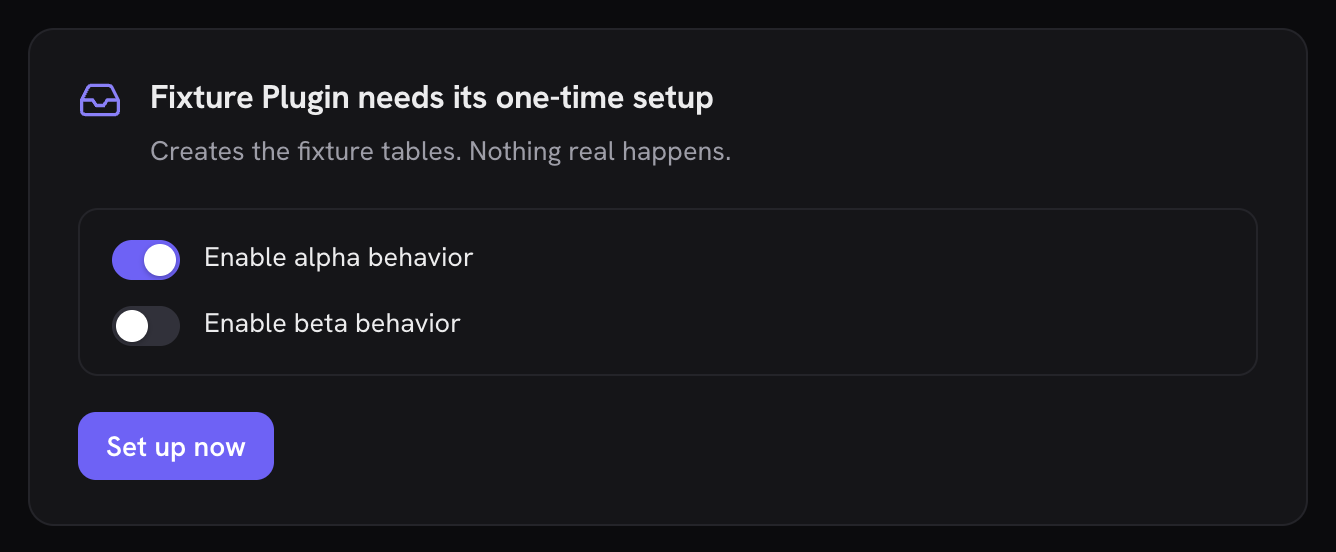
Some plugins need a first-run install before they work at all (Redirection creates its tables and default group in its setup wizard; until then every write fails). Declaring setup keeps the surface honest: while setup is needed, the collection, create and actions are unreachable and the user sees a setup card in their flow instead of a raw plugin error.
'setup' => array(
    'needed'  => function () {                       // truthy = gate the surface
        return my_plugin_needs_install();            // keep it cheap: runs on app boot
    },
    'title'   => 'My Plugin needs its one-time setup',
    'note'    => 'What the setup does, in a sentence or two.',
    'options' => array(                              // optional: your wizard's questions
        array( 'id' => 'monitor', 'label' => 'Monitor permalink changes', 'default' => true ),
        array( 'id' => 'ip',      'label' => 'Store IP addresses',        'default' => false ),
    ),
    'run'     => function ( $choices ) {             // $choices: id => bool
        return my_plugin_install( $choices );        // true or WP_Error
    },
),
Rules:
neededruns on every app load, so keep it to option reads. A throwing check reads as not-needed: a broken gate can never brick a working surface.runmust route through your plugin's own installer, never a rebuilt copy of it. It receives the toggles as booleans (undeclared ids are dropped, absent ones get your declared default) and runs viaPOST minn-admin/v1/surfaces/{id}/setup.- Setup is gated on a real capability (since 0.38.0). Running an installer is the one place a descriptor
capis an authorization decision rather than nav gating, soreadis not an answer to "may this person run this". The route usessetup.capwhen you declare one, else the surface'scap, and falls back tomanage_optionswhen that isreador empty. This matters if you followed the advice above and declaredcap => 'read'so you could gate in your own routes: say what setup needs explicitly withsetup.cap, or it gets the floor for site configuration. - Options are the place for your wizard's questions. Default privacy-relevant choices (IP logging, telemetry) to off; Minn will not make those choices silently.
- Setups Minn genuinely cannot run inline (an external auth flow, say) can declare
hrefinstead ofrun; the card renders an honest link-out and the surface comes alive once your setup marks itself done.
status — a card above the list
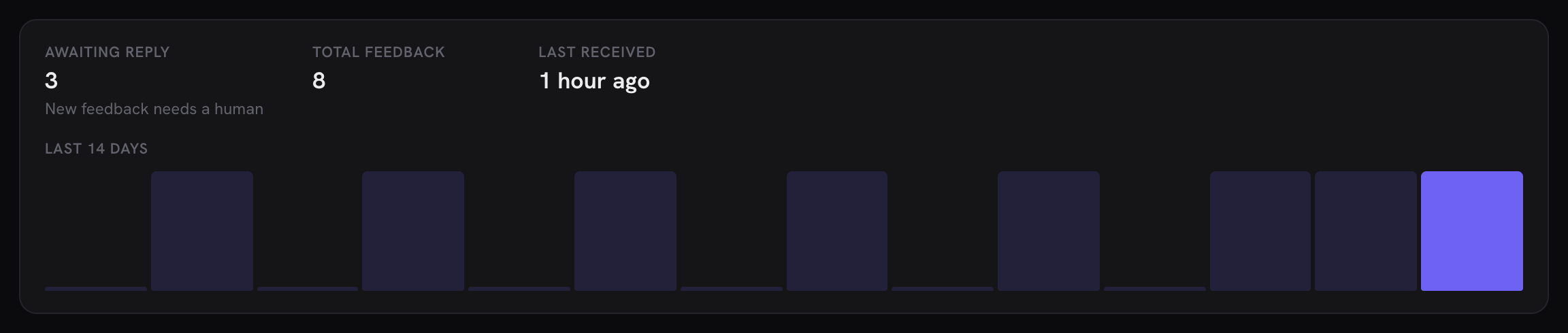
For surfaces where the list alone doesn't tell the story (Disembark's Backups view is the reference), declare status.route and return:
{
    "rows": [
        { "label": "Last scan", "value": "3 hours ago", "hint": "142,318 files · 2.1 GB" }
    ],
    "command": {
        "label": "Back up from any terminal",
        "text": "disembark connect https://example.com abc123…",
        "hint": "Requires the Disembark CLI."
    },
    "actions": [
        { "label": "Clean up working files", "route": "your/v1/cleanup", "method": "POST", "confirm": "Really?", "danger": true },
        { "label": "Open Disembark ↗", "href": "https://example.com/wp-admin/tools.php?page=disembark" }
    ]
}
rows render as a stat strip (send display-ready strings; format server-side). command renders as a click-to-copy monospace box; omit it when there's nothing to copy. actions render as buttons: with route they POST (or method) and re-fetch both the status and the list on success, confirm shows a native confirm first, danger styles the button red, and href renders a plain new-tab link instead of a request. An action may declare fields (the create-field vocabulary) to become parameterized: the button swaps for an inline form and the values merge into the request body ("Send a test email" with an address field is the bundled Gravity SMTP reference). Omit any key you don't need; conditional actions are just actions your route leaves out of the response.
Long-running actions — job: true (since 0.38.0). An action that takes minutes (a site export, a reindex over a big catalog) should not hold a button. Declare job: true and have its route answer right away with a job descriptor:
{ "job": { "id": "6a980406ccaff", "label": "Exporting site", "message": "Preparing export…",
           "statusRoute": "your/v1/export/6a980406ccaff",
           "stopRoute": "your/v1/export/6a980406ccaff", "stopMethod": "DELETE" } }
Minn then shows the job as a pill in the topbar on every route ("Exporting site · 62%"), polls statusRoute every 1.5 seconds, opens a small modal on click (progress bar, latest message, Stop when stopRoute is given), keeps the job across a reload, and re-fetches your surface once it ends. The status route answers { status, percent?, message?, result? } with status one of running, done, error, canceled; percent 0–100 when known (omit it and the bar runs indeterminate); result { label, href? } names the outcome (a download link, say). A descriptor may set statusMethod: "POST" when the status route does a chunk of the work on each poll (a builder whose engine runs one step per call, the way Duplicator's own screen loops); Minn polls every 1.5 seconds either way. One job runs at a time; a second start replaces the pill. The bundled All-in-One WP Migration adapter is the reference: its routes dispatch to the plugin's own ai1wm/v1 controller and translate its status option onto this shape.
Optional chart draws a compact bar series under the rows (same visual language as the Overview traffic/activity chart). Shape:
{
    "title": "Last 14 days",
    "primary": "Sent",
    "secondary": "Failed",
    "points": [
        { "label": "Jul 1", "value": 5, "secondary": 1 },
        { "label": "Jul 2", "value": 3, "secondary": 0 }
    ]
}
points is required (skip the key when empty). label is display-ready; value is the solid bar and the first tip row. When secondary is present on the chart (or on any point), bars become dual: a soft total bar (value + secondary) behind the solid primary bar, with tip rows named by primary / secondary (defaults "Count" / "Other"). Single-series charts omit secondary and render one accent bar per point. The bundled Gravity SMTP adapter is the reference (daily sent/failed from its events table).
A point may also carry extra: further outcomes beyond the two named series, each { "label", "value" }. They raise the soft total bar and list in the tip after the two series (rows with a zero value are dropped), so a day's bar can agree with the list's "All" count without inventing a third bar. Gravity SMTP sends its sandboxed and filtered counts this way, which is how a site in test mode still sees activity on the chart:
{ "label": "Jul 1", "value": 5, "secondary": 1, "extra": [ { "label": "Sandboxed", "value": 12 } ] }A bar can also narrow the list beneath it. Give each point the window it covers and declare dateQuery on the collection:
{ "label": "Jul 1", "value": 5, "secondary": 1, "from": "2026-07-01 00:00:00", "to": "2026-07-01 23:59:59" }'collection' => array(
'route' => 'your/v1/log',
'dateQuery' => 'after={from}&before={to}',
// …
),Bars with something in them take the pointer; a click appends the template with that point's from / to, a chip beside the tabs names the bar's label and clears it, and the same bar again clears it too. The bounds are opaque to Minn and come back exactly as you emitted them, so use the clock your log stores (Gravity SMTP's are UTC, FluentSMTP's are site-local) and read them in your list route as an inclusive window on that same column. Bucket the days in the site's timezone, whatever the column's clock, so a bar lines up with the Date column beside it (which renders in site time). Ignore a value that is not shaped like a datetime rather than guessing at it. The window combines with tabs and search, so it must AND with them.
settings — a schema-driven settings view
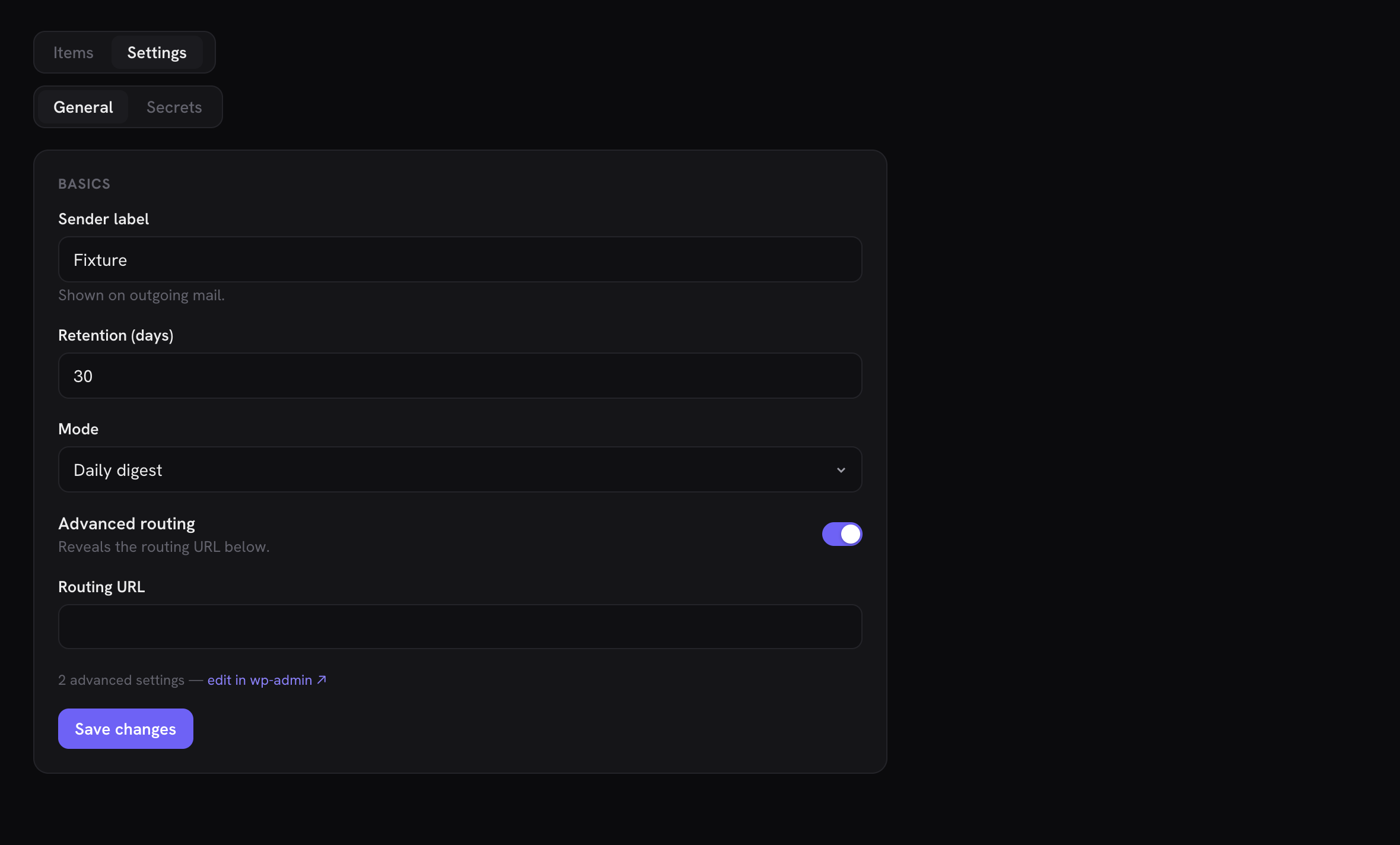
Your plugin's settings, rendered by Minn from a schema your route serves at runtime. Declare the tabs and one route; Minn draws the forms with the same field engine that powers create/edit forms and editor panels, so when your plugin adds a field, coverage updates itself with no Minn release:
'settings' => array(
    'label' => 'Settings',                 // view-switcher label (default "Settings")
    'cap'   => 'manage_options',           // optional: hides the VIEW from users
                                           // without the capability (the surface
                                           // itself may be readable more widely);
                                           // your route's permission_callback is
                                           // the real write gate
    'tabs'  => array(
        array( 'id' => 'general', 'label' => 'General' ),
        array( 'id' => 'logging', 'label' => 'Logging' ),
    ),
    'route' => 'my-plugin/v1/minn-settings/{tab}',
),
The route implements one contract per tab:
GET {route}returns the schema and current values in one response:
{
    "groups": [
        {
            "title":  "Sending",
            "fields": [
                { "key": "from_name", "label": "From name", "help": "Shown on outgoing mail." },
                { "key": "retention", "label": "Retention (days)", "type": "number", "min": 1 },
                { "key": "mode",      "label": "Mode", "type": "select", "options": [ ["digest", "Daily digest"], ["instant", "Instant"] ] },
                { "key": "enabled",   "label": "Advanced routing", "type": "toggle" },
                { "key": "route_url", "label": "Routing URL", "mono": true, "showWhen": { "key": "enabled", "equals": true } }
            ],
            "locked": 2
        }
    ],
    "values":   { "from_name": "Minnow", "retention": 30, "mode": "digest", "enabled": false },
    "adminUrl": "https://example.com/wp-admin/admin.php?page=my-settings"
}
POST {route}receives{ "values": { … } }holding only the keys the user actually edited and returns the same shape, fresh. Return aWP_Errorto refuse a save; the message shows as a toast and the form keeps what was typed.
Fields use the shared form vocabulary: key, label, type (text default · textarea · number · select (rendered as Minn's themed searchable dropdown, never a native select popup) · combobox (the themed autocomplete over options, right for long catalogs) · toggle · email · url · since 0.31.0 also multicheck, link ({ title, url, target }), image, file, gallery, wysiwyg, date/datetime/time, suggest/relation (with a route), rows — a repeater on a settings page, same subfields + [{ __idx, values }] contract as the editor-panel version — and flex, rows whose every row picks its schema from a layouts map ({ name: { label, subfields, subLocked } }), each row carrying its __layout alongside __idx. Flex cards collapse by default and the add button offers the layout list; a row naming a layout the map does not declare renders inert and is never rewritten), options ([value, label] pairs), placeholder, help (rendered under the control), rows (textarea height), min/max, mono, and showWhen: { "key": …, "equals": … } (the row shows only while the controlling field holds that value, evaluated live as the user edits). A group's locked count says "N advanced settings — edit in wp-admin ↗" via adminUrl for anything too bespoke to render generically.
Rules of the road:
- Because only edited keys ride the save, untouched values never round-trip through your sanitizers.
- Secrets: serve them masked with a recognizable sentinel and skip the write when the sentinel rides back (Gravity SMTP's
****************semantics). A field the user touched but left masked must never clobber the stored secret. - Read and write through your plugin's own settings APIs inside the route, so constant-lock, encryption and validation semantics stay yours.
- A surface may be settings-only: omit
collectionentirely and the settings view renders as the whole page, with no view switcher. If your plugin registers its options through the core WP Settings API, the bundled Perfmatters adapter is the reference for reading that registry as the schema at runtime instead of hand-copying fields. - Settings can be item-scoped: a
routecontaining{id}renders the settings view per item instead of globally. The Settings tab leaves the view switcher (there is no item yet to render), and entry happens from a row instead: declare an action{ "label": "Form settings", "settingsItem": true }on the list whose rows own the settings, and clicking it opens the settings view for that row ({id} and {tab} both substitute into the route; the toolbar names the item). The bundled Gravity Forms adapter is the reference: its Forms view's rows open each form's own settings, with the schema read from Gravity Forms' Settings framework at request time.
collection
| Key | Meaning |
|---|---|
route | REST route for the list. May contain {tab} (replaced with the active tab value) |
allRoute | Route used for the "All" tab when route contains {tab} |
query | Extra query string appended to every request (sorting etc.) |
pageQuery | Pagination template, default per_page=25&page={page}. {page} is 1-based; use {page0} for zero-based APIs (Redirection). Use your API's own style, e.g. Gravity Forms' paging[page_size]=25&paging[current_page]={page} |
itemsKey / totalKey | Where items/total live in the response body. Omit both for standard WP collections (plain array + X-WP-Total header) |
tabs | Either { "route": "...", "valueKey": "id", "labelKey": "title" } to build tabs from a REST call, or { "param": "status", "static": [["sent","Sent"],["failed","Failed"]] } for fixed tabs sent as a query param. allLabel names the first tab |
viewLabel | Names this collection in the view switcher (with manage) and in the search placeholder |
columns | Array of { key, label, format, altKey, width, utc }. key supports dot paths (initiator_data.user_login); altKey is a fallback key read when the primary is empty. Formats: title, text (default), pill, ago, mono, num (right-aligned numeric), id (#123, same cell as Users — not a count), entry-summary (for form-entry rows whose answers live under numeric field-id keys: renders the first few answer values as the row's summary — see any bundled forms adapter's list). width overrides the column's grid width; defaults are sized by format. For ago, bare datetimes parse as site-local: set utc: true for UTC-stored timestamps (or use a key ending in _gmt, or emit a trailing Z). Since v0.18.0 a column may also carry sort: the {by} token your route understands for that column (see sortQuery below). Columns without sort keep plain headers; without any sort pick, list order stays whatever your route returns, so declare your default in query (newest-first is the convention) |
detail | Detail modal config: detailRoute (fetch full item by {id}), sectionsRoute (server-built display model, an alternative to detailRoute + labels, below), labels (resolve numeric field-id keys to human labels — the per-form fields case: { "route": "your/v1/forms/{form_id}/fields", "valueKey": "id", "labelKey": "label", "itemsKey": "fields" }. {placeholders} in the route fill from the item, Minn maps valueKey → labelKey over the response array — or over itemsKey inside it — and caches the map per route URL. Fixed-schema items skip labels entirely: snake_case response keys already render as words), messageKey (render one field as a large text block — HTML messages render in a sandboxed iframe with remote content blocked until the viewer chooses Load images, plain text in a <pre>), skip (keys to hide), edit (inline editing, below), replyCap (forms family: the capability that may email a submitter from the entry page; without it only manage_options can. A reply from anyone below manage_options goes From their own address, as Gravity Forms' own note email does, never the site's) |
actions | Buttons in the detail modal and the list-row ⋯ / right-click menu: { label, method, route, body, confirm, danger, when, href, fields, settingsItem, list, download } — each key detailed in the actions section below |
sortQuery | (since v0.18.0) A query-string template with {by} and {dir} (e.g. orderby={by}&direction={dir}). Columns carrying a sort token render clickable headers: first click sorts (numeric and ago columns start descending, everything else ascending), a repeat click flips direction, and the template is appended to the list request. Omit it and headers stay plain |
search | A query-string template with {q} (e.g. filterBy[url]={q} or search={q}). Adds a filter box to the toolbar; the term is debounced and appended to the list request. For APIs that take search criteria as a JSON string (Gravity Forms), use the object form: array( 'param' => 'search', 'json' => <criteria array with '{q}' where the term goes> ) — the term is JSON-escaped and the criteria double-URL-encoded to match APIs that urldecode() the param themselves |
dateQuery (v0.39) | A query-string template with {from} and {to} (e.g. after={from}&before={to}). When the surface's status card carries a chart whose points declare from / to, each bar with something in it becomes a click: the list narrows to that bar's window, a chip beside the tabs names the day and clears it, and the same bar again widens the list back. The bounds are passed back verbatim and combine with tabs and search, so your list route reads the two parameters with the same clock the chart used. See the status chart section |
filter (v0.12) | A second list dimension beside tabs, rendered as a segmented control — shapes and the json-merge rule in the filter section below |
filterBar | Wear the orders filter bar instead of the pill strip: a status dropdown that holds more than one status at once, Add filter, chips beneath, and the whole narrowing in the URL. Replaces tabs, filter and the surface's own search box — see the filterBar section below |
bulk | Bulk actions: the same shape as actions minus href (a batch always needs a route). Declaring any adds a checkbox column (shift-range, Select page) and a selection bar. Each action runs per selected item ({id} replaced; one failure never aborts the rest), when is evaluated per item so a mixed selection skips ineligible rows, a button whose when matches nothing on the current page isn't offered at all, and the result toast reports done / skipped / failed |
open (v0.31) | { "route": "your-page/{id}" } — row click NAVIGATES to an app route instead of opening the detail modal (and the row menu's Open follows). For records that earn a page by the pages-versus-modals test below: sub-resources and workflows of their own. With create.open: true and a create route that answers with the new record's id, the new record opens on that page instead of returning to the list. The bundled ACF Field Groups surface opens its group builder this way, and Gravity Forms its form builder (whose New form uses create.open) |
create | Adds an "Add" button + form modal. { label, route, method, fields, defaults, open } — fields are { key, label, mono, type, value, placeholder, rows, options, required, clearable } (dot-path keys supported, e.g. action_data.url; clearable adds an empty "—" choice to a select, so an item whose stored value is empty keeps it on an edit instead of taking the first option); defaults are merged under the typed values so fixed fields (group, match type) ride along. Field types: text (default), number, textarea (rows sets its height), select (options as [value, label] pairs), tags (comma-separated input, submitted as an array), email, url, toggle (a switch, submitted as a boolean). Every field is required unless it declares required: false. A failed create (your route returning WP_Error) toasts your error message and keeps the form open as typed. open: true sends a successful create to the new record's page (the collection's open route, filled with the id your route answers) instead of back to the list |
import (v0.31) | { label, route, accept, hint } — adds an "Import" button beside Add that opens a pick-a-file / paste-the-contents dialog. The chosen file's text (or the pasted text) POSTs to route as { "content": "…" }; your route validates, does the work, and returns { "message": "…" } for the toast — or WP_Error with a plain-language message, which keeps the dialog open. accept limits the file picker (e.g. ".json,application/json"); hint renders under the form. The bundled ACF Field Groups surface imports ACF export JSON this way |
collection.actions — verbs on rows and in the detail modal
Each action is { label, method, route, body, confirm, danger, when, href, fields, settingsItem, list, download, follow }:
route—{id}is replaced with the item id, URL-encoded (a:is kept, for compositeform:idids), so keep ids free of/: a route whose id pattern admits one receives%2F, which Apache refuses by default;methoddefaults to POST (DELETE is fine; several bundled adapters use it for permanent removal);bodymerges into the request. The route may return{ "message": "…" }to replace the default "⟨label⟩ — done" toast, the honest channel for outcomes the label can't promise (the bundled Gravity SMTP send-a-test reports when another active mailer actually carried the send).confirmshows a native confirm first;dangerstyles the button red.when: { key, equals }offers the button only while the item's field matches (Activate vs Deactivate, Mark-read only while unread).hrefrenders a plain link instead of firing a request;{field}placeholders fill from the item. Links open in a new tab, and an href that leaves the site always renders with the ↗ affordance (see External links are always marked).fields(v0.12) makes the action parameterized: clicking swaps the button row for an inline form (the create-field vocabulary; every field required unlessrequired: false) and typed values merge intobody(dot paths supported) before the request fires: "Add note" and "send to ⟨address⟩" shapes. Parameterized actions stay detail-only by default. Setlist: trueto add one to the list-row menu; choosing it opens the same fields in a focused dialog. Status-card actions acceptfieldsthe same way.settingsItem: true(v0.13) fires no request: it opens the surface's item-scoped settings view for the row (requires asettings.routecontaining{id}; see the settings section).download: true(v0.31) makes the action a file download: the route is fetched with GET and must return{ "filename": "…", "content": "…", "mime": "…" }; the browser is handed the content as a file. Nothing is assumed to have changed server-side, so the list isn't refreshed and an open detail modal stays put (the bundled ACF Field Groups surface exports a group's JSON this way).follow: true(v0.40) makes the action a departure: the route runs as usual (method,body) and must answer{ "url": "…", "message"?: "…" }; the browser then goes to that URL in the same tab, showingmessageas a toast first when present. Use it for a link that has to be minted per click, such as a one-time sign-in into another site, which anhrefcould never carry (the bundled WP Freighter surface opens a tenant this way). Status-card actions acceptfollowthe same way. Nothing is refreshed, since the page is leaving.- Every non-parameterized action also appears on the list row's ⋯ / right-click menu (Open is always first); set
list: falseto keep a verb detail-only. For a parameterized action,list: trueexplicitly adds it to that menu.
collection.filter — a second dimension beside tabs
Rendered as a segmented control: { label, options, query } or { label, options, param, json }. options are [value, label] pairs and the FIRST is the default, always sent. A long list (more than six, or labels that would overflow the strip) becomes the same themed combobox the tab strip uses.
- The plain form appends
querywith{v}replaced (status={v}). - The json form merges into the SAME criteria object as an object-form
searchwhen they shareparam. That merge is the point: Gravity Forms takes status and field filters inside one JSONsearchparam, and two independent writers would clobber each other. - Pair filters with
when-gated actions so each filter view offers the verbs that make sense there (Received: Spam / Trash · Trash: Restore / Delete permanently). routeloads the options the waytabs.routedoes, for vocabularies that grow at runtime (Gravity SMTP's sending-plugin origins live in the log, not in a boot snapshot).{ valueKey, labelKey, allLabel }name the item fields and the first "no narrowing" row (its value is empty, so the query is omitted). Fetch happens when the list loads, not when the app boots. Staticoptionsstill work; declare one or the other.
collection.filterBar — the orders filter bar on your surface
Tabs answer "show me one status". Some lists need more: two statuses at once, a date window, a narrowing worth pasting to a colleague. Declaring filterBar gives your surface the same bar WooCommerce Orders wears, rendered by Minn:
'filterBar' => array(
    'searchPlaceholder' => 'Search gift cards (code, recipient…)',
    'statuses' => array(              // your own vocabulary, [value, label]
        array( 'active',   'Active' ),
        array( 'disabled', 'Disabled' ),
    ),
    'kinds'    => array( 'status', 'date' ),   // what Add filter offers
),
What you get, with no client code: a status dropdown (single-status shortcuts, the tab strip folded into a menu), Add filter for the kinds you declared, removable chips with Clear all, and every filter mirrored into the URL so a filtered list survives a reload and can be shared.
What your route must answer, in WooCommerce's own parameter vocabulary:
status=anywhen nothing is selected, and repeatedstatus[]=<slug>when one or more are. Handleany: it means no narrowing, not a status you registered.after=/before=as ISO datetimes when a date window is active.
kinds names the dimensions Add filter offers: status, date, and the WooCommerce-specific customer and product lookups. Only declare a dimension your route can really narrow on. Filtering the page in the browser is a lie the moment the list paginates: page 2 of an unfiltered query is not page 2 of a filtered one, and the count describes neither.
filterBar replaces tabs, filter and the surface's own search box, so declare one or the other. The count on the right stays Minn's own noun: its plural vocabulary is a fixed, extracted list, and a noun arriving from a plugin could never be pluralized in the reader's language.
Pages versus modals
Minn's rule for when a record gets a detail modal and when it earns a full page with its own URL: a modal is for a glance (read the record, run a quick verb, close); a record earns a page when it has sub-resources or workflows of its own, or a URL worth sharing with a teammate. WooCommerce orders are the precedent: the order page at /orders/{id} hosts the full working surface (items, payment, refunds, emails, notes, related orders) while Quick view stays a modal for the one-click look from the list. Both presentations share one detail body, so neither drifts. Subscriptions, products, coupons, customers, users, memberships and membership plans have pages by the same test, and customers and coupons have no modal at all.
Creating a page-worthy record happens on its page, never in a dialog. /orders/new, /products/new, /coupons/new, /users/new and /membership-plans/new are the record's own page over a blank record; nothing is stored until Create (or the first Save), which then puts the new record's own address in place of the new one, so Back returns to the list.
Plugin surfaces get the modal by default. Entries, log rows and packages are glance-shaped, and the sectionsRoute detail plus row actions cover them. A record that passes the test gets a page through collection.open (a builder, a plan), or through its family's own page (bookings and Forms entries, below). A surface whose records carry sub-resources Minn cannot draw should link out to its own screen (the href action) rather than simulate a page inside the modal. If Minn promotes a surface detail to a real page, it will be by this same test, not by popularity.
detail.edit — inline editing in the detail modal
Let users edit an item's fields in place and save through your plugin's own update endpoint:
'detail' => array(
    'edit' => array(
        'route'    => 'redirection/v1/redirect/{id}',   // update endpoint; {id} replaced
        'method'   => 'POST',                            // default POST
        'preserve' => array( 'match_type', 'group_id' ), // untouched fields sent along so
                                                         // your sanitizer doesn't reset them
        'fields'   => array(
            array( 'key' => 'url', 'label' => 'Source URL', 'mono' => true ),
            array( 'key' => 'action_data.url', 'label' => 'Target URL', 'mono' => true ),
            array( 'key' => 'action_code', 'label' => 'HTTP status', 'type' => 'number' ),
        ),
    ),
),
Each field is { key, label, mono, type }: key supports dot paths (action_data.url reads and writes { "action_data": { "url": … } }), mono renders a monospace input, and type: "number" sends a numeric value. Edit fields accept the same vocabulary as create fields (textarea, select with options, tags, rows, placeholder): both render through the same form engine. Fields shown as inputs are hidden from the static detail rows automatically. The bundled Redirection adapter is the reference.
The save still sends the whole record your sanitizer expects, but not as the dialog loaded it. On Save the dialog reads the item again (through detailRoute, or the list page it came from) and sends the fields the person edited plus every other edit field and preserve key as stored now, so a change made while the dialog was open (another tab, your own screen, one of the surface's actions) is kept. One rule follows, and Minn's own suite holds its bundled adapters to it: never preserve a key one of the surface's actions sets in its body, such as an on/off switch with Activate and Deactivate actions. Leave that key to the actions and have your route keep a field it is not sent: if the fresh read fails, the dialog falls back to the copy it opened with, and a preserved switch would go back to that state.
detail.sectionsRoute — server-built detail view
Instead of detailRoute + labels, your endpoint can return the whole display model in one response, with labels already resolved server-side. sectionsRoute (with {id}) must return:
{
    "kind": "entry",
    "sections": [
        { "title": "Response",   "rows": [ { "label": "Email", "value": "dana@example.com", "type": "email" } ] },
        { "title": "Submission", "rows": [ { "label": "Date",  "value": "2026-07-09 14:02" } ] }
    ],
    "adminUrl": "https://example.com/wp-admin/admin.php?page=…"
}
kind picks the layout: "entry" renders the contact-style form-entry view (name and email hero, message body, quiet meta), "activity" renders the audit-event view (who, event message, context chips), "booking" opens a full page in the same two-column card shape as an order (appointment + payment on the left, customer + notes on the right; dates render as readable local times, never a raw UTC stamp). Bookings-family surfaces (family: "bookings") navigate to /{surface}/{id} on row click so the record gets a page of its own, the way Orders does. Omit kind for a plain grouped key/value view. adminUrl links the item's wp-admin screen and suppresses any href action that points at the same place. The bundled Gravity Forms adapter (entries) and WP Activity Log adapter (events) are the references.
A row's type picks how its value renders (plain grouped layout only; the entry and activity cards have their own structure). Since v0.18.0 the vocabulary is:
type | Renders as |
|---|---|
| (omitted) | Plain value; multiline or long values stack under the label |
url | A link opening in a new tab (https?:// values only) |
email | A mailto: link |
pill | A status pill using Minn's shared status vocabulary (sent, failed, active, locked, …) |
code | An escaped monospace block (headers, raw payloads, stack traces, gift card codes); scrolls past ~14 lines. A non-empty value gets a copy icon button that writes the block to the clipboard |
html-preview | Your HTML in a fully sandboxed iframe (no scripts, opaque origin) — the honest way to show an email body or rendered template. The HTML never touches Minn's DOM. Remote images, stylesheets, fonts and media are blocked by default so a preview cannot fire tracking pixels; a "Load images" bar appears when the HTML references any. Add remote: true to the row when your plugin's own setting says remote content should always load |
kv-table | A two-column key/value table. value may be an object map, an array of [key, value] pairs, or an array of { "label", "value" } objects; capped at 60 rows |
Values are always escaped; html-preview is the one place your markup renders, and only inside the sandbox.
Make your forms plugin a first-class Forms provider
Forms plugins are the shape this API was built around, and they get extra machinery for free. The pieces, with the exact shapes the bundled forms adapters use (Gravity Forms, Ninja Forms, Forminator, Formidable, Fluent Forms, CF7 via Flamingo and CFDB7):
$surfaces['driftwood'] = array(
    'label'      => 'Forms',
    'sub'        => 'Driftwood',
    'icon'       => 'inbox',
    'cap'        => 'read',            // adapter-side gating: your routes check your own access model
    'family'     => 'forms',           // join the Forms provider switcher
    'group'      => 'workspace',       // entries are inbox-shaped
    'plugin'     => 'my-plugin',       // the card on Extensions links here
    'collection' => array(
        'viewLabel' => 'Entries',
        // Dynamic per-form tabs: {tab} in the route + an All route.
        'route'     => 'driftwood/v1/forms/{tab}/entries',
        'allRoute'  => 'driftwood/v1/entries',
        'tabs'      => array(
            'route'    => 'driftwood/v1/forms',   // one tab per form
            'valueKey' => 'id',
            'labelKey' => 'title',
            'allLabel' => 'All forms',
        ),
        'itemsKey'  => 'items',
        'totalKey'  => 'total',
        'search'    => 'search={q}',
        'columns'   => array(
            // Answers live under numeric field-id keys → entry-summary.
            array( 'key' => 'id', 'label' => 'Entry', 'format' => 'entry-summary' ),
            array( 'key' => 'form_title', 'label' => 'Form' ),
            array( 'key' => 'created', 'label' => 'Date', 'format' => 'ago', 'utc' => true ),
        ),
        'detail'    => array( 'sectionsRoute' => 'driftwood/v1/entries/{id}/view' ),
        'actions'   => array(
            array( 'label' => 'Mark as spam', 'route' => 'driftwood/v1/entries/{id}/spam', 'when' => array( 'key' => 'status', 'equals' => 'active' ) ),
            array( 'label' => 'Export CSV ↗', 'href' => 'https://example.com/wp-json/driftwood/v1/forms/{form_id}/export?token={export_token}' ),
            array( 'label' => 'Delete', 'route' => 'driftwood/v1/entries/{id}', 'method' => 'DELETE', 'confirm' => 'Delete permanently?', 'danger' => true ),
        ),
    ),
    'manage'     => array(
        'viewLabel' => 'Forms',
        'route'     => 'driftwood/v1/forms',
        'columns'   => array(
            array( 'key' => 'title', 'label' => 'Form', 'format' => 'title' ),
            array( 'key' => 'entry_count', 'label' => 'Entries', 'format' => 'num' ),
        ),
    ),
);
Piece by piece:
family: 'forms'— declare it. Same-family surfaces share one sidebar entry with a provider switcher in the topbar badge, and the user's pick is remembered per family. Coexistence with Gravity Forms (or anyone) is exactly that: your plugin becomes one of the providers behind the single Forms nav item, never a second sidebar row. The family also switches entry details to the contact-card layout (below) automatically. Minn prepends anidcolumn (#123, matching Users) oncollectionandmanageso you do not declare it yourself. A column you already markformat: 'id'is left alone. Ninja'sseqnumber is a different value and stays.- Dynamic tabs pair with
{tab}in the route: the tabs route returns your forms (array, or any object whose values are the forms),valueKeyfills{tab},labelKeynames the tab, andallRouteserves the All tab. (Staticparamtabs and dynamic route tabs are the two forms oftabs; pick one. A status dimension beside the form tabs is whatfilteris for.) entry-summaryis the list column for per-form field shapes: it collects the item's values under numeric keys (field ids:"1","2.3"), sorts them numerically, and shows the first three short ones (≤ 60 chars, single-line) joined with·. Long and multi-line answers stay in the detail. If your ids aren't numeric, send a ready-madesummarystring on each item instead; it wins over the heuristic.- The entry detail should be a
sectionsRoutereturningkind: "entry", the contact-card layout: name and email hero, message body, quiet meta. Minn picks the hero and body rows from your sections: the answers are the section titled like "Response" (else the first section), the meta is the one titled like "Submission" (else the second). Within the answers, a row's optionaltypeis the strongest hint (name,email,textareaorpost_contentfor the message body); without types, labels ("Name", "Email", "Message…") and value shape (an email-looking string, a multi-line or 120+ char value) decide. Sendform_nameon the item and the modal is titled with it, subtitled "Entry #id". - The entry page. A Forms family surface whose entries collection has a
detail.sectionsRouteopens each entry on a page of its own (your-surface/entry/{id}) instead of the modal, with no line of your own; set the collection'sopento send rows somewhere else. The page reads the samesectionsRoute: a contact card (name, email, phone, and Reply, which opens Minn's email composer with the form's title in the subject and sends throughminn-admin/v1/entries/reply: Minn re-reads the entry through your route as the current user, so your view permission decides, and sends only to an email address among its answers), long answers as message cards, the remaining answers, a notes timeline built from a section titled like "Notes", and the entry's actions and submission details in a side column. Previous / next (and ← →) step through the list the page was opened from. An action whose body setsis_starredbecomes the star in the page title, an action with a singletextareafield becomes the notes composer, and aDELETEaction (trash or delete) returns to the list once it lands; every other action reloads the page in place. Two optional keys on thesectionsRouteresponse make the page complete when it is reached by a link with no list loaded:item(the row as your list returns it, sowhen-conditional actions can be decided) andformRoute(a Minn route the form's name links to, such as the Gravity Forms builder). A sent reply is logged through the notes composer action when you have one. Gravity Forms is the reference. - Editing answers on the entry page. Add an
editblock to thesectionsRouteresponse, only for people your plugin lets edit entries, and the page gains Edit answers:{ route, fields, locked }.routeis where the save posts ({id}is filled in).fieldslists what may be edited, in form order and with empty answers included:{ id, label, kind, inputs: [ { id, label?, value, choice? } ], choices?, other? }. Kinds:text,email,url,tel,number,date(the value isY-m-d),textarea,choice(one ofchoices, given as[ value, label ]pairs, or any text whenotheris true),multi(an array of choice values),checks(one input per choice, each carrying itschoicevalue; the page sends true or false) andparts(a name or address: one input each).lockednames the answers that stay in your own screen (files, payments…); the page says so. The save posts{ values: { inputId: value }, original: { inputId: value } }with only the inputs that changed, andoriginalholding what the page loaded. Refuse with 409 when the stored value no longer matchesoriginal(someone edited it meanwhile), and with 400 plusdata.fieldset to the input id to mark a field. Write through your plugin's own save so its formatting and hooks run. If that save replaces the whole entry (fields left out are blanked or deleted), merge the changed inputs into the stored entry first and save all of it. Gravity Forms' version (gravity-forms-entry-edit.php) is the reference. manageis the Forms companion view: the Entries/Forms switcher every forms plugin wants. Keep it a list (title, entry count, maybe an activate toggle via awhen-pair of actions); the ID column is prepended with the Entries list. The form builder stays your own UI, linked honestly with anhrefaction ('label' => 'Edit form ↗'). Minn will not reimplement it.- Export is an
hrefaction pointing at your own download endpoint, with{field}placeholders filled from the item (put a nonce or signed token in the item so the link is self-authorizing; actionhrefs open as plain new-tab links and carry no REST headers). Minn has no streaming-download primitive; the honest link is the pattern.
The shim tutorial's Campfire example is this recipe minus the per-form machinery: start there for the table/shim mechanics, then add the pieces above. For a production-grade reference of the full shape, the bundled includes/adapters/gravity-forms.php is the deepest instance.
Hook reference
Surfaces are the front door, but Minn's whole extension surface is this set of public hooks, each with its own section below or its own contract note:
| Hook | Kind | Purpose |
|---|---|---|
minn_admin_surfaces | filter | Sidebar views (lists, tabs, detail modals) — the descriptor reference above |
minn_admin_editor_panels | filter | Per-post fields or status/action panels in the editor sidebar |
minn_admin_traffic | filter | Overview chart traffic provider |
minn_admin_traffic_day | filter | Overview traffic bar drill-down (top pages / referrers for a date window) |
minn_admin_traffic_report | filter | Stats page range-wide breakdowns (generic sections: pages, referrers, countries, devices…) |
minn_admin_block_forms | filter | Block inspector labels/controls + slash insert templates |
minn_admin_insert_blocks | filter | Prune or extend the auto-insert slash list |
minn_admin_page_builders | filter | Register a full-canvas page builder |
minn_admin_bar_template_edits | filter | Extra Edit targets on the front-end bar (templates rendering on this page). Each item is { url, label, sub?, hint? }. Deduped against the page's own Edit URL. |
minn_admin_design_sources | filter | Register a design/template library for the slash menu + block picker |
minn_admin_editor_commands | filter | Register free-form slash-menu / block-picker commands (boilerplate HTML, island templates, async routes) |
minn_admin_before_render_blocks | action | Register assets before island do_blocks |
minn_admin_render_styles | filter | Extra CSS URLs / inline CSS for island previews |
minn_admin_rendered_html | filter | Rewrite one island's rendered HTML (maps, fallbacks) |
minn_admin_favicon | filter | URL of the browser-tab icon for Minn's app on sites without a Site Icon (a theme's brand mark); without one Minn uses its own mark in the viewer's accent (since 0.43.0) |
minn_admin_shortcode_hints | filter | Describe your shortcodes for the editor's shortcode tokens: a label and attribute choices with the output each prints (since 0.43.0) |
minn_admin_acf_preview_render | filter | ( bool, block name ): return false to keep an ACF v3 block's island preview on the front-end render instead of ACF's preview render (since 0.43.0) |
minn_admin_template_footer | action | End of Minn's app document (no wp_head/wp_footer) |
minn_admin_option_pages | filter | Add a page of site-wide fields to the shared Site options item |
minn_admin_field_group_sources | filter | Add your field groups as a view on the shared Field Groups item |
minn_admin_cache_purgers | filter | Join the "Clear site cache" palette command |
minn_admin_spam_providers | filter | Add a provider card to Settings → Spam |
minn_admin_license_providers | filter | Report your license state on the Licenses card, optionally with activate / deactivate / re-verify |
minn_admin_comments_enabled | filter | Override comments detection (nav, palette, badge) |
minn_admin_respect_removed_menus | filter | Return false to stop Minn's nav mirroring remove_menu_page() removals (since 0.26.0). It also turns off the plugin hiding minn_admin_admin_page_hidden drives: no plugin leaves Minn for being hidden in wp-admin |
minn_admin_watched_admin_menus | filter | Adjust which admin-menu slugs map to which Minn nav items for removal mirroring (since 0.26.0) |
minn_admin_admin_page_hidden | filter | ( bool, page slug, parent slug ): return true when your menu tool hid this admin page from the current user on purpose (the parent is '' for a top-level page). A plugin (or theme) whose every menu page is hidden, and at least one of them vouched for this way, leaves Minn for that user: the surfaces that declare it as their plugin drop out of the nav, ⌘K and Extensions, and a surface without a plugin key stays. A surface that lists several plugins (Field Groups, Site Options) leaves only when every one of them that has admin pages of its own is gone; a plugin with no pages (a Pro add-on extending the free plugin's screens) has no say. A post type or taxonomy list the plugin registered that is still in the menu (Elementor's Templates) keeps only a surface that is that list: declare it with contentTypes (array( 'pt:elementor_library' ), 'tax:<taxonomy>'), and the plugin's other surfaces leave. A surface whose plugin has no admin page of its own (its settings are a tab of a shared dashboard, as JetSearch's are of Crocoblock's) can name the pages that host it with adminPages (array( 'jet-dashboard-settings-page' )), and leaves when every one of them is hidden. Pages a framework several plugins bundle and load from one copy draws belong to none of them (Crocoblock's dashboard, Freemius' Account and Contact pages, YITH's panels, Tools › Scheduled Actions, and CMB2, Redux, Codestar, Carbon Fields and ThemeIsle SDK pages), unless the page sits under a top-level menu a plugin draws itself and the copy that drew it is that plugin's own (Rank Math's settings pages). A surface whose plugin's pages such a framework draws names them with adminPages (YITH Gift Cards names its panel). A list (the main collection, manage, or a view you append to another plugin's surface in views) can carry its own plugin and leaves with your plugin; a main list that leaves gives way to the next. Absence alone never counts, because plugins hide their own setup pages too, so only a tool answering this filter hides anything: Adminimize or a remove_menu_page() snippet does not. The answer comes from the notices capture (the hidden wp-admin load Minn runs when the app opens and the last capture is 15 minutes old), is kept per user and per site, and lapses after a week with no fresh capture. Hiding is presentation only: your routes keep their own gates. The bundled White Label CMS adapter is the example and, today, the only tool that answers (since 0.45.0) |
minn_admin_visibility_providers | filter | Report an active maintenance / coming-soon / password mode (Overview banner, topbar chip, System check) |
minn_admin_media_folders | filter | Feed the Media view's folder filter from your folder plugin (since 0.18.0) |
minn_admin_log_sources | filter | Add a log to System's log viewer (since 0.19.0) |
minn_admin_revision_fields | filter | Report what a revision changed OUTSIDE the content, for the revision comparison (since 0.31.0) |
minn_admin_sites | filter | Off multisite only: feed the topbar site switcher and the ⌘K "Switch to…" commands. Return { sites: [ { id, name, url, app, login, current } ], total }; an entry with a login REST route (instead of an app URL) is opened by POSTing to it and following the url it answers, for hosts whose sites share no session. Empty unless at least two entries (since 0.40.0) |
minn_admin_nav_group_labels | filter | Rename a sidebar group heading: { group => label }. Only network is honoured today, so a plugin that hosts several sites in one install (WP Freighter) can call the group Tenants (since 0.40.0) |
Minn deliberately never fires wp_head/wp_footer (its document stays clean), so developer tooling that wants to render into the page attaches at minn_admin_template_footer; the bundled Query Monitor adapter is the reference.
Block inspector forms — minn_admin_block_forms
> Building blocks for Minn? Start with content-blocks.md: the north > star (writing editor vs layout tool), the content-block contract, and when to use islands > vs a full schema. This section is the filter/descriptor reference for that contract. > Anchor Blocks app/MinnAdmin.php is the > reference adapter.
Minn's editor renders complex blocks as read-only islands, and the block inspector (the ⚙ chip on every island) generates a config form from each block's registered attribute schema. The schema goes a long way on its own: attributes with an enum render as selects, an attribute named content (or holding long text) gets a textarea, and labels are humanized from the key. What a schema can't express is the rest of the intent: a friendlier label than the key name, human option labels, a guaranteed textarea. This filter layers that on:
add_filter( 'minn_admin_block_forms', function ( $forms ) {
    $forms['my-plugin/testimonial'] = array(
        'order'      => array( 'author', 'quote', 'tone' ),   // field order
        'attributes' => array(
            'author' => array( 'label' => 'Author' ),
            'quote'  => array( 'label' => 'Quote', 'control' => 'textarea' ),
            'tone'   => array(
                'label'   => 'Tone',
                'control' => 'select',
                'options' => array( array( 'light', 'Light' ), array( 'dark', 'Dark' ) ),
            ),
            'legacy' => array( 'hide' => true ),              // keep out of the form
        ),
    );
    return $forms;
} );
Per attribute: label, control (text · textarea · select · number · checkbox, shown as a switch), options ([value, label] pairs, implies select), hide. Without a descriptor the inspector falls back to schema-derived controls, so this is refinement, not requirement. Attributes with a source (stored in saved HTML) are never form-edited.
Prefer expressing what you can in the attribute schema itself: declare enum on fixed-choice attributes and the generic form renders a select with no descriptor at all (and every other schema consumer benefits too). Reach for options only when the raw values need human labels.
dataForm — form-edit fields nested inside one object attribute
Some blocks keep their real content nested inside a single object attribute rather than as top-level attributes. ACF blocks are the canonical case: the comment carries "data": { "field": value, "_field": "field_key" } and the generic form rightly skips object attributes as too structural. A dataForm descriptor names that attribute and describes its subfields, and the inspector renders them as a real form:
$forms['acf/testimonial'] = array(
    'attributes' => array(
        'name' => array( 'hide' => true ),  // wrapper plumbing — hide it
        'data' => array( 'hide' => true ),
        'mode' => array( 'hide' => true ),
    ),
    'dataForm'   => array(
        'attr'   => 'data',                          // the object attribute
        'fields' => array(
            array( 'name' => 'author', 'label' => 'Author', 'control' => 'text' ),
            array( 'name' => 'tone', 'label' => 'Tone', 'control' => 'select',
                   'options' => array( array( 'light', 'Light' ), array( 'dark', 'Dark' ) ) ),
        ),
        'alias'  => array( 'author' => 'field_abc123', 'tone' => 'field_def456' ),
        'locked' => 2,                               // fields the form can't render
    ),
);
Per field: name (key inside the object), label, control (text · textarea · select · number · checkbox · image · gallery · richtext), options ([value, label] pairs). alias maps a field name to a value written as _name alongside it (ACF's field-key references, so the plugin's renderer can resolve values on blocks Minn created or filled). locked renders an honest "N advanced fields live in the block editor" note. On write, unknown and underscore keys already in the object are preserved untouched, and a field that was never present and is still empty injects nothing. Checkbox values store as 1/0 (ACF's convention); a key that already holds a real boolean keeps its boolean type. image stores a bare attachment id: picks go through Minn's media picker and apply immediately (the picker closes the popover, so pending typed values are folded first); in the content-editor modal, image fields fold into the locked count instead. gallery stores an ordered array of attachment ids (written as strings, ACF's block convention) and opens Minn's images editor — reorder, replace, remove, add, drop-to-upload — applying immediately the same way. richtext stores an HTML fragment string and opens Minn's rich-text modal, also immediate-apply. The bundled ACF adapter generates these descriptors automatically for every registered acf/* block from its field groups; declare your own only for non-ACF blocks with the same nested-object shape.
Dynamic blocks insert automatically — no descriptor needed
If your block is fully server-rendered (a render_callback or render file does the work and your JS save() is null), it is already insertable in Minn with zero adapter code. For those blocks a self-closing comment is valid saved markup, so Minn auto-registers every dynamic, top-level, inserter-visible non-core block that renders output from a bare comment as a search-only slash-menu entry: it doesn't clutter the default menu, but typing part of its title (or its namespace, so /my-plugin lists everything you ship) surfaces it. Insertion drops <!-- wp:your/block /--> as an island, renders the real preview, and opens the schema-driven inspector. (Core blocks are excluded from the auto list because Minn has native flows for them, with one exception: a curated allowlist of widget-shaped core blocks — Latest Posts, Archives, Calendar and friends — rides the same probe and entries.)
The render probe is the honesty gate. is_dynamic alone doesn't mean a bare comment is valid: hybrid blocks (a render_callback plus a JS save() that emits wrapper HTML, or a render that only processes saved inner blocks) render nothing standalone and would fail Gutenberg's block validation if Minn inserted them, so they are excluded. If your block renders empty without attributes, give it sensible defaults or ship an insert.template.
To make the most of the auto-insert, register your blocks well server-side:
titlein PHP registration (orblock.json) — without it Minn falls back to a humanized slug ("report-card" → "Report Card").parent/ancestorfor child blocks, declared server-side — declared children are excluded from top-level insertion, exactly like Gutenberg's inserter. Aparentthat only exists in your editor JS is invisible to Minn (and to every other server-side consumer), so your child blocks would show up as standalone inserts.supports.inserter = falsehides a block entirely.- Attribute schemas in PHP — they are what the inspector's generated form is built from;
enumattributes become selects, defaults pre-fill.
Static-save blocks (HTML produced by your editor JS save()) never auto-insert; only your JS can produce their markup. Give those an explicit insert.template below.
To suppress an auto entry without providing a template, set 'insert' => false in the block's descriptor. Sites can also prune or extend the whole list via the minn_admin_insert_blocks filter.
insert — offer the block in the editor's / menu
Declare starting markup and your block appears in Minn's slash menu (an explicit template always supersedes the auto entry). It's inserted as a configurable island (real server-rendered preview, inspector opened immediately):
$forms['my-plugin/testimonial'] = array(
    'insert' => array(
        'label'    => 'Testimonial',                    // slash-menu entry
        'icon'     => '❖',                              // optional, one glyph
        'template' => '<!-- wp:my-plugin/testimonial {"author":"…"} /-->',
    ),
    // …attribute refinements as above
);
template is full raw block markup: you know your block's canonical shape (wrapper HTML, starter children, default attrs); Minn inserts it verbatim. Only declare insert on blocks that make sense at the top level (parents and standalone blocks, not children).
wrapperText — editable text in an InnerBlocks wrapper
Static InnerBlocks parents often bake a heading into their saved wrapper HTML (e.g. a conversation block's header). Declare it editable with a regex of exactly three capture groups, (prefix)(text)(suffix):
$forms['my-plugin/panel'] = array(
    'wrapperText' => array(
        array( 'label' => 'Heading', 'pattern' => '(<div class="panel-head">)([^<]*)(</div>)' ),
    ),
);
The text is replaced in place only when it actually changed; an untouched wrapper stays byte-identical. Patterns that don't match simply don't render a field, and a generic text-run field never doubles a matched pattern (the labeled field wins). Note that Minn's generic text runs already make wrapper text editable with no descriptor; wrapperText is worth declaring when you want a labeled, single-purpose field instead of a generic "Text" run. For a real-world reference of a block plugin shipping its own descriptors, Anchor Blocks registers insert templates and semantic labels from its own plugin (app/MinnAdmin.php); the filter is a no-op when Minn isn't installed, so block plugins can ship it unconditionally.
Island previews — free path first, adapter only when stuck
Complex blocks land in Minn as islands: the saved markup is preserved byte-for-byte, and the ⚙ chip opens the inspector. Previews are not a second editor canvas. Minn POSTs the raw markup to minn-admin/v1/render-blocks, runs do_blocks() server-side, diffs the style queue, scopes any new CSS into .minn-island-preview, and sets the result with innerHTML. That design is intentional: islands stay safe to serialize, never reimplement your React UI, and still look like the front end when assets show up.
Design for that path and most blocks need zero Minn-specific code. When something still looks empty, giant, or unstyled, the checklist below is the same one Minn's own adapters follow.
Free path (no adapter): make do_blocks honest
- Server-render meaningful HTML. A bare
<!-- wp:your/block /-->(or with default attrs) should produce visible markup. If output is empty without attrs, set attribute defaults inblock.json/ PHP registration, or ship aninsert.templatewith starter markup. - Register front-end styles at
init, not only whenhas_block()finds them on a singular post. Preferblock.json"style": "file:./style.css"so core registers the handle when the block is registered. If you use a named handle ("style": "my-block-style"), callwp_register_style()in the same place youregister_block_type(). Minn (and any other headlessdo_blocksconsumer) will then auto-enqueue on render. - Do not gate styles on
is_admin()or editor-only hooks for the front-end stylesheet. Editor styles (editorStyle) stay editor-only; the style handle is what previews and the public site share. - Size icons and SVGs in CSS (
max-width/width/heighton the SVG or a wrapper class). Unconstrained SVGs look like "broken giant icons" in any CSS-less context, not only Minn. - Prefer static or server HTML for maps / charts / carousels when possible, or accept that a pure client-side shell will look empty in previews until you add a fallback (below).
- Put text and image URLs in saved HTML (or attrs that mirror that HTML). Minn can already edit generic text runs and swap images inside islands without per-block code when the content lives in the markup.
- ACF Pro blocks: mark the fields you print verbatim. Minn previews ACF v3 blocks through ACF's own preview render (
$is_previewis true, as in the block editor), so ACF's inline-editing contract carries over unchanged: an element marked withacf_inline_text_editing_attrs( 'field' ), or a block withautoInlineEditing, is typed over in place and the edit lands in that field alone. Gate your markers on$is_preview(ACF 6.8 prints them on the front end too) and leave fields that render through a shortcode or a computed fallback unmarked, or a typed edit would replace the source with its output. Minn handles those itself: a shortcode shows as a token inside the editable text (click it to edit or remove the shortcode, typeto add one, see [Shortcode hints below), and a textarea printed as a list or paragraphs is editable line by line. For fields that are not text (a button's URL, a select), mark the element withacf_inline_toolbar_editing_attrs( array( 'url', 'style' ) ): in Minn the element itself opens a popover with just those fields (a URL field searches your content), and a chip on hover shows where a link goes. Mark a photo the same way with its image field alone (acf_inline_toolbar_editing_attrs( array( 'image' ) ), ACF's own pattern for images, on the<figure>or wrapper) and a click opens the media picker; a gallery field alone opens the Images editor. A marker naming a photo and other fields keeps the popover, with a working photo row. A photo left unmarked still gets the same click when Minn can pair its<img>with exactly one image or gallery field by the attachment's file URL; a picture two fields share stays sidebar-only. Without upload rights photos stay sidebar-only too. A block that marks nothing still gets its text and textarea fields edited in place where the template read the field (throughget_field()), the preview shows the stored words once, and nothing else reads the same.
What Minn already does for free (no adapter):
| Behavior | Mechanism |
|---|---|
| Dynamic block slash-insert | Render probe on bare comment; search-only entries |
| Schema inspector | Attr schema from register_block_type / block.json |
| Live preview HTML | do_blocks via render-blocks |
| Styles enqueued during render | Style-queue diff after do_blocks |
| Site + block library CSS | editor-styles + client scoper on .minn-island-preview |
| Text / image edit in islands | Generic text runs + image URL swap |
| ACF block copy edited in place | ACF's inline-editing markers in the preview render, else unique value match |
| Design libraries / patterns | Registered block patterns are automatic; libraries via minn_admin_design_sources (below) |
| Writing shortcuts / boilerplate | Free-form slash commands via minn_admin_editor_commands (below) |
Shortcode hints — minn_admin_shortcode_hints
Inside in-place block text, a shortcode shows as a token: an atomic chip with the shortcode's output, which a click opens to edit its source or remove it. Typing [ in that text offers the shortcodes a theme or plugin describes. Describe yours so the token offers real choices instead of raw attributes:
add_filter( 'minn_admin_shortcode_hints', function ( $hints ) {
	$hints['fact'] = array(
		'label'  => 'Business fact',
		'fields' => array(
			array(
				'name'    => 'key',
				'label'   => 'Fact',
				// value, label, what it prints now (shown in the picker and on the token)
				'options' => array( array( 'years', 'Years in business', '15+' ), array( 'sites', 'Websites built', '200+' ) ),
			),
		),
	);
	return $hints;
} );
Only registered shortcodes are kept, option values lose ", [ and ], and the list is served to users who can edit posts (GET minn-admin/v1/shortcodes). A shortcode with no hint still shows as a token whose source can be edited by hand.
When the free path fails: diagnosis → drop-in adapter
| Symptom in Minn | Likely cause | Fix without Minn code | Drop-in adapter if you can't change that |
|---|---|---|---|
| Empty island, full in block editor | Hybrid: JS save() owns markup; bare comment renders nothing | Fully server-render, or ship insert.template with real save markup | minn_admin_block_forms → insert.template |
| Content present but huge SVGs / broken layout | Front-end CSS never registered on REST render | Register style at init (file:./style.css or wp_register_style) | minn_admin_before_render_blocks + minn_admin_render_styles |
| Looks right on front end after a visit, empty in Minn | CSS only exists as postmeta / browser-compiled cache | Emit CSS from do_blocks or enqueue a real stylesheet | minn_admin_render_styles (postmeta / warm URL); see Otter |
| Empty map / slider / Lottie shell | Server outputs a div + script; innerHTML never runs scripts | Server-render a static fallback (image, iframe, noscript) | minn_admin_rendered_html swap to iframe/static |
| Insert works, inspector empty | No attr schema server-side | Register attributes in PHP / block.json | minn_admin_block_forms labels only refine schema |
| Static-save design library | Only editor JS can author full designs | Publish serialized templates (JSON/CDN) Minn can fetch | Design source (minn_admin_design_sources, below) |
Preview hooks (copy into includes/minn-admin.php)
All of these no-op when Minn is not installed.
1. Register styles before render (named handles that core would not see otherwise):
add_action( 'minn_admin_before_render_blocks', function ( $blocks, $post_id ) {
	// $blocks is an array of raw markup strings for the islands being previewed.
	if ( ! minn_admin_markup_has( $blocks, 'my-plugin/' ) ) {
		return;
	}
	wp_register_style(
		'my-block-style',
		plugins_url( 'build/style.css', MY_PLUGIN_FILE ),
		array(),
		MY_PLUGIN_VERSION
	);
}, 10, 2 );

function minn_admin_markup_has( $blocks, $needle ) {
	foreach ( (array) $blocks as $raw ) {
		if ( is_string( $raw ) && false !== strpos( $raw, $needle ) ) {
			return true;
		}
	}
	return false;
}
Once the handle is registered, Minn's do_blocks + queue-diff path enqueues it the same way the front end would.
2. Hand CSS URLs or inline CSS directly (postmeta caches, CSS embedded in attrs, etc.):
add_filter( 'minn_admin_render_styles', function ( $styles, $blocks, $post_id ) {
	// $styles = [ 'urls' => string[], 'inline' => string, optional 'warm' => url ]
	$styles['urls'][] = plugins_url( 'build/style.css', MY_PLUGIN_FILE );
	if ( $post_id ) {
		$cached = get_post_meta( $post_id, '_my_plugin_generated_css', true );
		if ( is_string( $cached ) && $cached !== '' ) {
			$styles['inline'] .= "\n" . $cached;
		}
	}
	return $styles;
}, 10, 3 );
Optional 'warm' => $front_end_url: Minn loads that URL in a hidden iframe once so a browser-only compiler can fill a cache, then re-fetches styles (Otter atomic-wind).
3. Rewrite HTML for JS-only shells (maps, widgets that need a script runner):
add_filter( 'minn_admin_rendered_html', function ( $html, $raw, $post_id ) {
	if ( false === strpos( $raw, 'my-plugin/map' ) ) {
		return $html;
	}
	// Parse attrs from $raw or scrape them from $html; return a static preview.
	return '<iframe src="…" style="width:100%;height:400px;border:0" loading="lazy" title="Map"></iframe>';
}, 10, 3 );
Prefer fixing the free path in your plugin when you can. Adapters are for constraints you cannot change (third-party hosting of CSS, JIT compilers, legacy registration order).
Reference adapters in Minn (read these first)
| Adapter | Teaches |
|---|---|
includes/adapters/otter.php | Lazy named styles + postmeta CSS + map HTML fallback + warm URL |
includes/adapters/essential-blocks.php | CSS carried inside submitted block attrs |
includes/adapters/stackable.php | Design-library insert when static-save blocks cannot auto-insert |
includes/adapters/kadence.php / generateblocks.php | Same library pattern over the plugin's own REST/cache |
Anchor Blocks app/MinnAdmin.php (external) | minn_admin_block_forms owned by the block plugin itself |
Internal lab notes (CSS models, hybrid traps): docs/block-suites.md.
Design libraries — minn_admin_design_sources
If your plugin ships a template library (whole sections of serialized block markup users insert as a unit), register it as a design source. Designs appear as search-only entries in the editor's slash menu and as a labeled group in the block picker (⌘/):
add_filter( 'minn_admin_design_sources', function ( $sources ) {
    $sources['my-plugin'] = array(
        'label' => 'My Library',                 // block-picker group name
        'route' => 'my-plugin/v1/minn-designs',  // implements the pair contract below
    );
    return $sources;
} );
The route implements a two-endpoint contract:
GET {route}returns the slim list:{ "designs": [ { "id": "hero-1", "label": "Hero 1", "category": "Heroes" } ] }(categoryis optional, shown as the entry's meta). Minn fetches it lazily on the first slash-menu open and caches it for the session, so keep it fast and slim.POST {route}/{id}returns the insert payload:{ "template": "<!-- wp:… -->…", "block": "my-plugin/hero" }.templateis full serialized block markup (your canonical save output, Gutenberg-valid by construction; a single top-level block inserts as one island), and the optionalblocknames the island's chip.
Serve content the site can actually use (free tier only if your library is gated), and localize remote images at insert time: when Minn is installed, minn_admin_localize_images( $template ) (see includes/adapters/media-localize.php) sideloads them into the media library and rewrites the URLs, deduping by file name. Guard the call with function_exists since your route is registered even when Minn isn't. Give the routes a permission_callback (edit_posts matches the editor). The bundled Stackable, Kadence and GenerateBlocks adapters register through this same filter and are the references.
Editor slash commands — minn_admin_editor_commands
When your plugin wants a writing action rather than a block (boilerplate paragraphs, a pre-built island template, or markup fetched from your REST API), register a slash-menu command. Commands appear in the editor's / menu and the block picker (⌘/), with no third-party JavaScript in the Minn document:
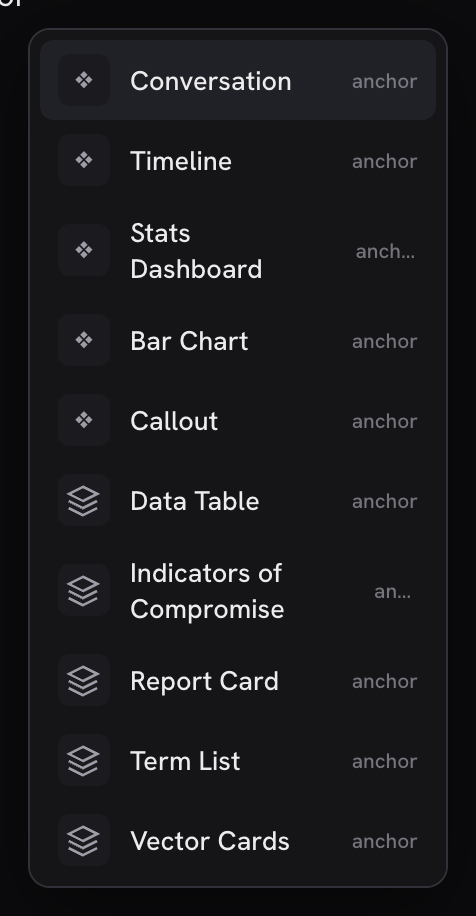
add_filter( 'minn_admin_editor_commands', function ( $commands ) {
    // 1. Synchronous prose HTML (paragraphs, simple markup the serializers keep).
    $commands[] = array(
        'id'         => 'my-plugin/cta',
        'label'      => 'CTA boilerplate',
        'icon'       => 'send',              // lucide key or a short glyph
        'ns'         => 'my-plugin',         // badge in the slash menu; picker group
        'keywords'   => array( 'cta', 'convert' ),
        'searchOnly' => true,               // hide until the writer types a match
        'html'       => '<p><strong>Ready?</strong> Book a call this week.</p>',
    );

    // 2. Synchronous island template (serialized block markup).
    $commands[] = array(
        'id'       => 'my-plugin/callout',
        'label'    => 'Callout',
        'icon'     => 'block',
        'ns'       => 'my-plugin',
        'block'    => 'my-plugin/callout',  // island chip name; defaults to core/group
        'template' => '<!-- wp:my-plugin/callout -->…<!-- /wp:my-plugin/callout -->',
    );

    // 3. Async route: Minn POSTs/GETs and inserts the response.
    $commands[] = array(
        'id'     => 'my-plugin/latest',
        'label'  => 'Latest announcement',
        'icon'   => 'file',
        'ns'     => 'my-plugin',
        'route'  => 'my-plugin/v1/minn-command/latest',
        'method' => 'POST',                 // GET or POST; default POST
        'body'   => array( 'tone' => 'short' ), // optional JSON body (scalars only)
    );
    return $commands;
} );
Exactly one of html, template, or route is required. Descriptors with none or more than one are dropped. Keys:
| Key | Required | Notes |
|---|---|---|
id | yes | Stable slug (a-z0-9_-/) |
label | yes | Slash-menu / picker title |
html or template or route | one | Insert shape |
block | with template | Island block name (default core/group) |
method | with route | GET or POST (default POST) |
body | with route | Shallow map of scalar values for POST |
icon | no | Lucide key Minn already ships, or a short glyph |
ns | no | Namespace badge + picker group ({Ns} · commands) |
keywords | no | Extra search terms (slash menu and picker) |
searchOnly | no | When true, hide until the query matches (keeps / curated) |
Route responses must be one of:
{ "html": "<p>…</p>" }— inserted as prose (same path as a statichtmlcommand){ "template": "<!-- wp:… -->…", "block": "my-plugin/x" }— inserted as an island
Give the route a permission_callback (edit_posts matches the editor). The command list rides the boot payload and the mid-session editor-blocks re-poll (plugin toggles refresh it without a hard reload).
Editor panels — per-post fields in the editor sidebar
For plugins whose data lives inside the post (custom fields, SEO meta), register an editor panel instead of a surface. Same philosophy: a declarative descriptor, rendered by Minn. Your panel is a quiet door row in the editor sidebar (label, badge, one-line summary) that opens a modal with your fields:
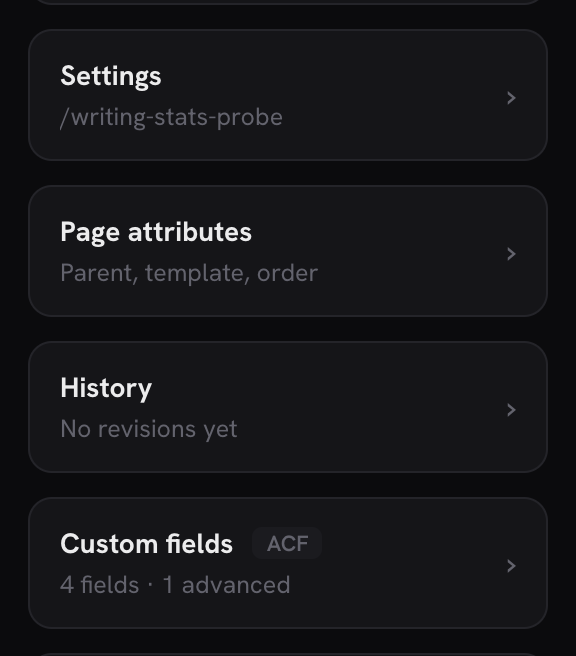
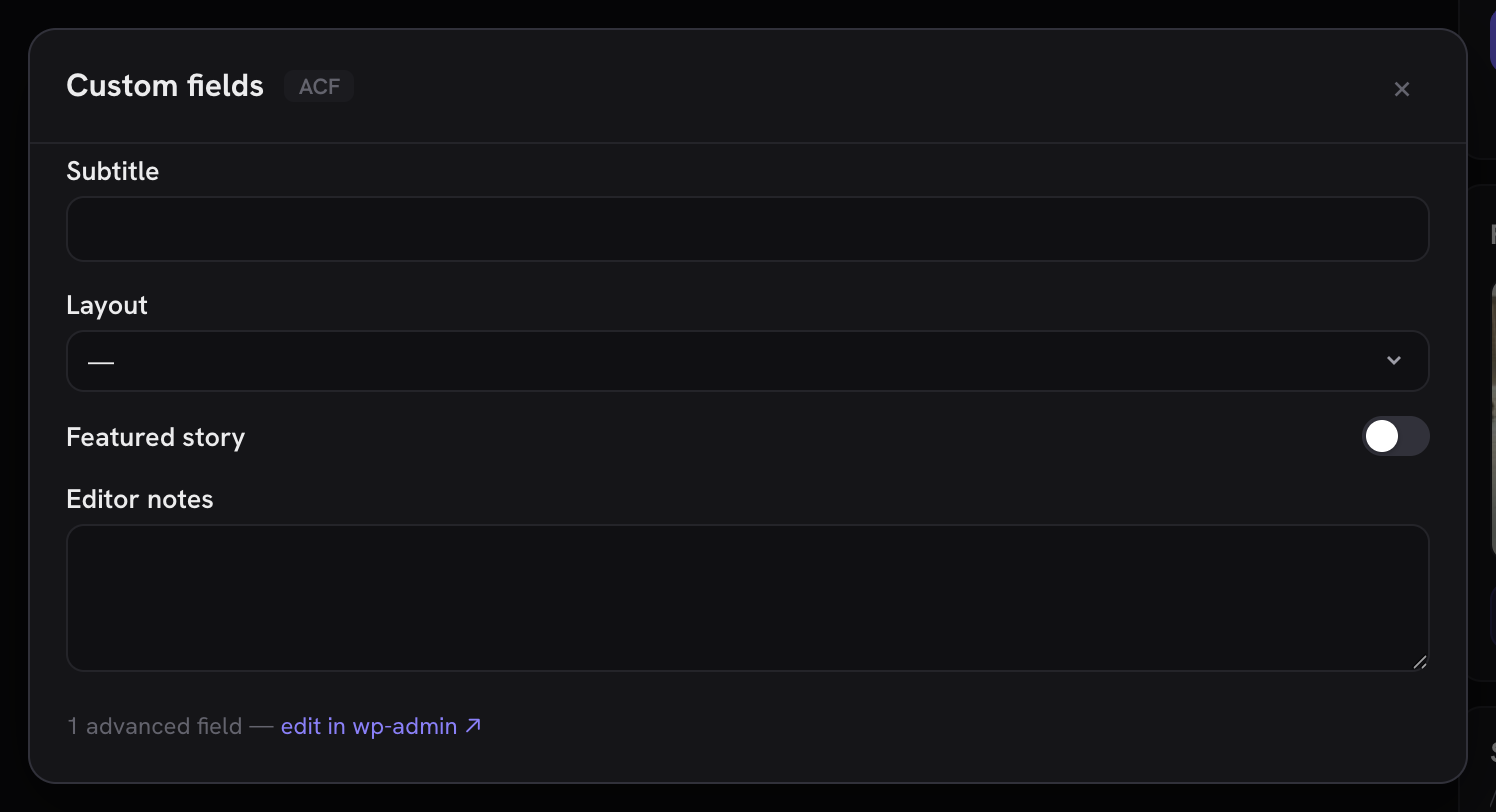
add_filter( 'minn_admin_editor_panels', function ( $panels ) {
    $panels['my-fields'] = array(
        'label'       => 'My fields',
        'sub'         => 'My Plugin',
        'cap'         => 'edit_posts',
        // Returns { groups: [ { group, fields: [ {name,label,type,choices,min,max} ], locked } ] }
        // for the post being edited. {id} = post ID (0 for new), {type} = REST base.
        'fieldsRoute' => 'my-plugin/v1/fields?post_id={id}&post_type={type}',
        'valuesKey'   => 'myplugin',   // key on the wp/v2 post response holding current values
        'writeKey'    => 'myplugin',   // key Minn writes changed values back under on save
    );
    return $panels;
} );
Supported field types: text, textarea, number, range, email, url, select, radio, true_false, color_picker (swatch + hex text), multicheck (multi-value choices as Minn switches; value = the on choice keys in order; declare choices), date / datetime (Minn's calendar popover; values YYYY-MM-DD / YYYY-MM-DDTHH:mm), time (lenient typed input normalized to HH:mm), image ({ id, url }, media picker), file ({ id, url, name }, the media picker over every attachment type), gallery (ordered [{ id, url }], Minn's images editor), wysiwyg (an HTML fragment string, edited in Minn's rich-text modal with pastes cleaned through the shared sanitizer), suggest, relation, and rows (below), and note (a read-only informational row; its value rides the panel read like any field and nothing is ever written back). Report anything else in the locked count; Minn shows "N advanced fields — edit in wp-admin ↗" rather than rendering something unsafe.
Panel fields also accept help (rendered under the control), counter (a live length readout such as the SEO title's 60, turning red past the limit), and cond (conditional visibility in the ACF format [[{ f, op, v }]] over sibling field names; a hidden field keeps its value and round-trips untouched). Since 0.35.0 a fields route may include a preview object alongside groups — { url, title, description, fields, vars } — and Minn renders it as a search-result snippet above the fields: fields maps a preview line to the field name that drives it, and vars is a token map (%token% or %%token%%) resolved live while typing. The bundled SEO panel is the reference.
rows (since 0.31.0) is a repeating group — the ACF-repeater shape. The field declares subfields (the simple vocabulary above, minus pickers and nested rows) and optionally subLocked, an honest count of per-row fields the form can't render. The value is an ordered [{ "__idx": n, "values": { name: v } }] list: __idx is the row's position in YOUR stored data at read time, and comes back on kept rows so your write path can merge edits onto the original row — that's what keeps sub-values the form never rendered (images, nested structures) intact through edits, reorders and deletions. Rows without __idx are new; omitted rows are deleted; the list order is the new order. The bundled ACF adapter's repeater support is the reference. Values ride the normal post save (autosave included), so your plugin only needs its values readable/writable on the post REST response (register_rest_field, the way the bundled ACF adapter's minn_acf field works).
What a save sends (since 0.45.0). The object under writeKey holds only the fields that changed since the panel loaded or last saved; a field the person left alone is not in it at all (a rows field that changed goes whole). So a field someone else changed after the post opened (another tab, your own screen) keeps their value. Your write path must leave an absent field as stored, never read it as cleared. If your plugin's save takes the whole form at once and empties what it is not given, fill the absent fields from storage before calling it, as the bundled Events Calendar adapter does for saveEventMeta(). After a save each panel's baseline moves to what that save sent, so a field edited while the save was in flight still differs and goes with the next one, and a field the post comes back holding empty although the save sent a value stays changed.
suggest (since 0.18.0) is an async-searching picker for linked records whose option list is too large or too live for a select (venues, organizers, related posts). The field declares a route; Minn fetches it with &q= as the user types and expects a plain array of { value, label } rows (Minn prepends its own "— None" clearing row). The field's current value in your valuesKey payload is { value, label } (or '' for none), and the same shape comes back on save, so read the id from value. The bundled Events Calendar adapter's venue picker is the reference.
relation (since 0.31.0) is suggest's ordered-multi sibling: the same route + &q= search, but picks append as chips the user can drag to reorder and remove with ×. The value is an ordered [{ value, label }] list, and the same shape comes back on save — read the ids from value in order. Already-picked rows are filtered out of the results client-side. The bundled ACF adapter's relationship fields (and its /acf/relation search route, which honors each field's own post-type/taxonomy/role constraints) are the reference.
The bundled ACF adapter (includes/adapters/acf.php) is the reference implementation.
Status panels — post-scoped status and actions (since 0.25.0)
Some per-post features are not fields at all: they report state and offer verbs (send this post as a newsletter, purge this page from a CDN, share to social). For those, register the panel with a statusRoute instead of the field keys. The door shows your summary line and opening it renders your status rows plus action buttons; Minn supplies all the UI.
add_filter( 'minn_admin_editor_panels', function ( $panels ) {
    $panels['newsletter'] = array(
        'label'       => 'Newsletter',
        'sub'         => 'My Plugin',
        'cap'         => 'manage_options',
        // GET; {id} = post ID, {type} = REST base. Only fetched for saved posts.
        'statusRoute' => 'my-plugin/v1/newsletter/{id}',
    );
    return $panels;
} );
The status route returns everything the panel shows:
{
    "summary": "Not sent · 57 subscribers",
    "tone":    "amber",
    "note":    "Optional paragraph shown above the rows.",
    "rows":    [ { "label": "Status", "value": "Not sent", "tone": "amber", "hint": "…" } ],
    "actions": [
        { "label": "Send preview to me", "route": "my-plugin/v1/newsletter/123/send",
          "body": { "send_to": "preview" }, "hint": "Sends to you@example.com" },
        { "label": "Send to all subscribers (57)", "route": "…", "body": { "send_to": "all" },
          "confirm": "This sends immediately to all subscribers.", "danger": true },
        { "label": "Send to email", "route": "…", "body": { "send_to": "custom" },
          "fields": [ { "key": "email", "label": "Email address", "type": "email" } ] },
        { "label": "Open in wp-admin", "href": "…" }
    ]
}
summary is the door's one-line state; tone (green / amber / red) tints it. Action routes are strings you build server-side (embed the post ID yourself), POSTed with the action's body. An action with confirm goes through Minn's themed confirm dialog (danger styles it red); an action with fields swaps its button for an inline form and merges the collected values into the body (the same field vocabulary as create forms). href actions render as links instead. The action response may carry { "message": "…", "status": { … } }: message replaces the default toast and a returned status repaints the panel and the door in the same round trip (otherwise Minn re-fetches your status route). Panels never render for unsaved posts, since there is no post to report on yet. A panel is either a fields panel or a status panel; statusRoute makes the three field keys optional.
For a complete real-world implementation (status builder, action endpoint, publish gating on the dangerous verb), see the newsletter panel in CaptainCore Manager (search for captaincore_newsletter_panel_status). The whole integration lives in that plugin; Minn ships nothing about it.
Traffic providers — power the Overview chart
Analytics plugins can replace the Overview "Activity" chart with real traffic by answering the minn_admin_traffic filter. Return daily visitor/pageview counts for the requested range plus the previous period's visitor total (used for the delta on the Visitors stat card):
add_filter( 'minn_admin_traffic', function ( $traffic, $days ) {
    if ( null !== $traffic ) {
        return $traffic; // another provider already answered
    }
    return array(
        'source'        => 'My Analytics',
        'days'          => array( // 'Y-m-d' => counts, covering the last $days days
            '2026-07-02' => array( 'visitors' => 120, 'pageviews' => 310 ),
            '2026-07-03' => array( 'visitors' => 141, 'pageviews' => 355 ),
        ),
        'prev_visitors' => 2210,  // visitor total for the $days before that
    );
}, 10, 2 );
Minn buckets the days to match the selected range (daily up to 45 days, weekly beyond), renders the Traffic chart with your plugin's name as the source badge, and leads the stat cards with Visitors and a period-over-period delta. Bundled adapters cover Koko Analytics (the reference implementation), WP Statistics, Burst Statistics, Independent Analytics, AnalyticsWP, Plausible Analytics, Matomo, Site Kit and Jetpack Stats. The first active provider answers, so a plugin registering its own adapter should return early when $traffic is already non-null.
Day drill-down — top pages for a chart bar
Clicking a Traffic bar opens a modal with the top pages (and optional referrers) for that bar's date window. Providers answer a second filter:
add_filter( 'minn_admin_traffic_day', function ( $data, $from, $to ) {
    if ( null !== $data ) {
        return $data; // another provider already answered
    }
    // $from / $to are inclusive Y-m-d calendar dates for the bar (one day
    // on the 7/30d chart; up to a week on 90d).
    return array(
        'source'    => 'My Analytics',
        'pages'     => array(
            array(
                'title'     => 'Homepage',
                'path'      => '/',
                'url'       => home_url( '/' ),
                'postId'    => 0,      // optional; >0 when the hit maps to a post
                'visitors'  => 120,
                'pageviews' => 310,
            ),
        ),
        'referrers' => array(  // optional
            array( 'label' => 'google.com', 'visitors' => 40, 'pageviews' => 55 ),
        ),
        'adminUrl'  => admin_url( 'admin.php?page=my-analytics' ), // optional footer link
    );
}, 10, 3 );
Return null (or leave $data alone) when you have no page breakdown for the window; the modal shows an empty state and still offers adminUrl when set. Bundled day adapters: Koko Analytics (post_stats + paths + referrer tables), WP Statistics (statistics_pages for hits + statistics_visitor.referred for referrers; WPS has no per-URI uniques, so both columns report hit totals), Burst Statistics (burst_statistics page_url/page_id + burst_sessions.referrer), Independent Analytics (views × resources + session referrers), Plausible Analytics (server-side shared-dashboard queries), Matomo (its reporting API), and Jetpack Stats (the WordPress.com Stats client). Same first-non-null rule as minn_admin_traffic.
Range-wide report — breakdowns for the Stats page
The Stats page (/minn-admin/stats) shows breakdown panels for the whole selected range, up to a year. Providers with richer dimensions answer a third filter with GENERIC sections — Minn renders whatever sections come back, in order, so a provider can expose countries, devices, campaigns or anything else it tracks without Minn knowing the dimension:
add_filter( 'minn_admin_traffic_report', function ( $report, $from, $to ) {
    if ( null !== $report ) {
        return $report; // another provider already answered
    }
    // $from / $to are inclusive Y-m-d dates covering the page's whole range.
    return array(
        'source'   => 'My Analytics',
        'sections' => array(
            array(
                'id'    => 'pages',
                'label' => 'Top pages',
                'rows'  => array(
                    // label is required; everything else is optional. A row
                    // with a url is clickable (opened with noopener).
                    array( 'label' => 'Homepage', 'sub' => '/', 'url' => home_url( '/' ), 'postId' => 0, 'visitors' => 120, 'pageviews' => 310 ),
                ),
            ),
            array(
                'id'    => 'countries',
                'label' => 'Countries',
                'rows'  => array( array( 'label' => 'United States', 'pageviews' => 408 ) ),
            ),
        ),
        'adminUrl' => admin_url( 'admin.php?page=my-analytics' ), // optional footer link
    );
}, 10, 3 );
Sections cap at 8 and rows at 25 server-side. You do not need this filter for basic coverage: when no provider answers, Minn synthesizes Top pages + Referrers sections from your minn_admin_traffic_day answer over the same range — every bundled day adapter aggregates a date window generically, so the whole family gets range-wide breakdowns for free. Answer this filter only to add dimensions the day shape cannot carry (bundled: Matomo adds countries, devices and site searches; Jetpack Stats adds countries, search terms and outbound clicks; Independent Analytics adds countries, cities, devices and browsers, plus campaigns and link clicks under Pro).
Media folders — feed the Media view's folder filter
If your plugin organizes the media library into folders, answer the minn_admin_media_folders filter and Minn's Media view gains a folder combobox fed by your data. Browse-first: Minn narrows its normal media query to your folder's attachment ids, so search, the type tabs and pagination all keep working, and Minn never grows a folder tree of its own. First non-null provider wins (same rule as minn_admin_traffic).
add_filter( 'minn_admin_media_folders', function ( $provider ) {
    if ( null !== $provider || ! defined( 'MY_FOLDERS_VERSION' ) ) {
        return $provider; // someone else answered, or we're not active
    }
    return array(
        'name'    => 'My Folders',      // named in the combobox tooltip
        'folders' => function () {
            // Flat list; parent 0 = root (Minn indents children for you).
            // id 0 is reserved: an optional "Uncategorized" row for files in
            // no folder, never treated as a parent. count is optional.
            return array(
                array( 'id' => 12, 'label' => 'Logos', 'parent' => 0, 'count' => 8 ),
                array( 'id' => 13, 'label' => 'Dark',  'parent' => 12, 'count' => 3 ),
            );
        },
        'ids'     => function ( $folder_id ) {
            // The folder's attachment ids (any order), or a WP_Error for a
            // folder this user may not browse. Minn re-orders newest-first
            // and caps at 500 before querying.
            return my_folders_attachment_ids( $folder_id );
        },
        'move'    => function ( $folder_id, array $attachment_ids ) {
            // Optional. When present, the media bulk bar gains a folder
            // picker and a Move button. Put the attachments in the folder
            // through your own machinery (0 = remove from every folder);
            // true or WP_Error. Callers hold upload_files; run your own
            // finer checks here. Omit it and Minn shows no Move control.
            return my_folders_move( $folder_id, $attachment_ids );
        },
    );
} );
Both callables run server-side as the browsing user (edit_posts floor), so per-user folder modes work by just reading your own scoped state. The bundled providers in includes/adapters/media-folders.php (FileBird, Real Media Library, Folders by Premio) are the reference; copy whichever storage shape matches yours (custom tables, an API, or a plain taxonomy). Since 0.18.0.
Field groups — one item, a view per plugin
ACF and ACPT both describe the same idea, a named group of fields attached to something, and each used to claim its own sidebar entry. They share one Field Groups item, a view per plugin:
add_filter( 'minn_admin_field_group_sources', function ( $sources ) {
	$sources[] = array(
		'id'         => 'my-plugin',
		'label'      => 'My Plugin',   // names the view's tab
		'cap'        => 'manage_options',
		'collection' => array( /* the usual collection descriptor */ ),
		'views'      => array( /* optional: further lists of your own */ ),
	);
	return $sources;
} );
collection is the ordinary collection vocabulary documented above, so a provider keeps whatever it offers: columns, tabs, actions, create, import, open. Bring more lists of your own in views and they stay directly behind yours in the switcher.
A view rather than one mixed list is deliberate. A row's verbs are not the same everywhere: groups that edit inside Minn and groups whose builder lives in the plugin's own canvas belong in lists that can each be honest about what they do. If your builder is a canvas Minn does not rebuild, list the groups and give the row an href action into your screen rather than a half-built form.
The first provider's list is the surface's collection; the rest become views named for their plugin. One provider needs no switcher and badges the item with its name instead.
Site options — one item for every plugin's option pages
Plugins that keep site-wide fields (ACF and ACPT among the bundled ones) used to claim a sidebar entry each, so a site running two of them grew two or three items describing the same kind of thing. They gather under one Site options item instead, each page a tab. Contribute one through minn_admin_option_pages:
add_filter( 'minn_admin_option_pages', function ( $pages ) {
	$pages[] = array(
		'id'     => 'my-plugin:brand',            // unique and stable
		'label'  => 'Brand kit',                  // names the tab
		'source' => 'My Plugin',                  // badge, optional
		'cap'    => 'manage_options',             // who sees the item
		'tabs'   => array(
			array( 'id' => 'tab-0', 'label' => 'Basics' ),
		),
		'route'  => 'my-plugin/v1/options/{tab}', // `{tab}` is your tab id
	);
	return $pages;
} );| Key | Required | Meaning |
|---|---|---|
id | Yes | Unique and stable; namespace it with your plugin |
label | Yes | The tab's name. A page with ONE tab is named for the page |
tabs | Yes | [{ id, label }]. A page with no tabs is not offered |
route | Yes | Answers the settings contract below; {tab} is substituted |
cap | No | Defaults to manage_options. An empty string denies everyone, the way WordPress reads it on its own menus; say read if you mean anyone |
source | No | Shown as the item's badge while one source is the only one |
route answers GET with { groups, values, adminUrl } and POST with the same shape after saving { values } — the settings contract used everywhere else in Minn (see "Settings" above). Minn dispatches to your route internally, so your own permission callback still runs on every request: this item gathers pages, it does not vouch for them. Values are keyed by each field's name (or key).
Only the label is Minn's: when one page exists it keeps its own name, and when several do the item becomes "Site Options" and each tab says which page it came from.
Cache purgers — join "Clear site cache"
Minn's ⌘K palette has a "Clear site cache" command that purges every detected cache layer, one request per provider. Caching and optimization plugins register a purger via the minn_admin_cache_purgers filter:
add_filter( 'minn_admin_cache_purgers', function ( $purgers ) {
    $purgers[] = array(
        'id'    => 'my-cache',   // stable slug
        'name'  => 'My Cache',   // shown in the palette entry and the result toast
        'purge' => function () {
            my_cache_flush_everything();
        },
    );
    return $purgers;
} );
The command is only exposed to users with manage_options, and your purge callback runs server-side on that request; no extra capability check is needed for the common case. Bundled providers in includes/adapters/cache-purge.php include LiteSpeed, WP Rocket, W3 Total Cache, SpeedyCache, Redis Object Cache, Breeze, Nginx Helper, Cloudflare, and more; copy any of them.
Log sources — System's log viewer
The System page's Debug tools card lists site logs (the WordPress debug log, the PHP error log when it is a separate file, and one source per WooCommerce log channel), each opening a full-screen tail viewer with a source picker. A plugin that keeps its own log, or a host mu-plugin that knows where the web server's logs live, can register a source via the minn_admin_log_sources filter. Since 0.19.0.
add_filter( 'minn_admin_log_sources', function ( $sources ) {
    $sources['my-plugin'] = array(
        'label' => 'My Plugin log',
        'group' => 'My Plugin',      // shown as "My Plugin · My Plugin log"
        'stat'  => function () {     // cheap: powers lists, never reads content
            $path = my_plugin_log_path();
            return array(
                'exists'   => file_exists( $path ),
                'size'     => file_exists( $path ) ? filesize( $path ) : 0,
                'modified' => file_exists( $path ) ? filemtime( $path ) : 0,
            );
        },
        'read'  => function () {     // the tail payload
            return Minn_Admin_Logs::tail_file( my_plugin_log_path() );
        },
        'clear' => function () {     // optional; omit for read-only sources
            return my_plugin_truncate_log() ? true
                : new WP_Error( 'clear_failed', 'Could not clear the log.' );
        },
    );
    return $sources;
} );
Source ids may use letters, digits, :, _, . and -. Minn_Admin_Logs::tail_file() serves the last 256 KB with the partial first line dropped; a read that builds its own payload should return the same shape (exists, path, size, size_human, truncated, content, optional note). The viewer is manage_options-only. Minn never guesses at web-server log paths: they are host-specific and usually outside open_basedir, so registering them is deliberately left to whoever controls the host.
Spam providers — Settings → Spam
Spam filtering plugins get a card on Minn's Settings → Spam page: configured state, all-time blocked count, a few safe toggles written through your own option shape, and a link to your full wp-admin screen. Register via the minn_admin_spam_providers filter:
add_filter( 'minn_admin_spam_providers', function ( $providers ) {
    if ( ! defined( 'MY_SPAM_PLUGIN_VERSION' ) ) {
        return $providers; // register only while your plugin is active
    }
    $providers[] = array(
        'id'     => 'my-spam',
        'name'   => 'My Spam Filter',
        'status' => function () {
            return array(
                'configured' => (bool) get_option( 'my_spam_key' ),
                'note'       => 'One-line status shown under the name',
                'blocked'    => (int) get_option( 'my_spam_blocked_total', 0 ),
                'toggles'    => array(
                    array(
                        'id'    => 'notify',
                        'label' => 'Email me about new spam',
                        'desc'  => 'What the switch does, in one sentence.',
                        'on'    => (bool) get_option( 'my_spam_notify' ),
                    ),
                ),
                'adminUrl'   => admin_url( 'options-general.php?page=my-spam' ),
            );
        },
        'set'    => function ( $toggle_id, $on ) {
            if ( 'notify' === $toggle_id ) {
                update_option( 'my_spam_notify', $on ? 1 : 0 );
            }
        },
    );
    return $providers;
} );
Toggles save through minn-admin/v1/spam (gated on manage_options); set runs server-side with the toggle id and the new boolean. Keep toggles to the two or three switches a site owner actually flips; deep configuration belongs on your own screen, which the card links to. Bundled providers (Akismet, Antispam Bee, CleanTalk) live in includes/adapters/spam.php and are the references.
Paste-a-key in place (optional). If your filter needs an API key and you also register a license provider (next section) with an activate callable, return its provider id from status() as keyProvider. The card then renders a key field that posts to minn-admin/v1/licenses/action, so the same guardrails hold: the key rides one request, is verified and stored by YOUR code, and is never retained by Minn. Omit keyProvider when the key is supplied in code (a constant or filter) or managed cloud-side. The field shows only to a user that route would let activate the provider: someone with manage_options who, on a network, is a super admin, and only while the provider still carries its activate callable for them (a provider whose own licence gate leaves the user out has it removed). Anyone else gets the card without the field (since 0.45.0). Akismet is the reference: its card field and its Licenses row drive the same provider.
Existing-account cleanup (optional). userCleanup: { count, checkUrl } on status() adds a row under the card: how many accounts the plugin has already marked as spam, a Review button into Users, and a Check ↗ link to the plugin's own scan screen. Use it when the plugin finds spam users (not just comments) and the scan itself is a progress UI Minn should not rebuild. CleanTalk is the reference: Minn lists and deletes the marked accounts; the cloud scan stays on CleanTalk's screen.
License state — minn_admin_license_providers
Extensions carries a Licenses card: every paid component and connected service on the site with its state (valid / expired / invalid / missing / unknown), read from stored options only. Reads never call a licensing API; if your plugin is commercial (or holds a service key or account connection), a provider makes that state visible where the site owner already looks. An optional category key on the provider (license — the default — key, or connection) sets the small chip on the row; use key for service credentials like Akismet's and connection for account or site links:
add_filter( 'minn_admin_license_providers', function ( $providers ) {
    $providers['my-plugin'] = array(
        'name'   => 'My Plugin Pro',
        'detect' => function () {
            return defined( 'MY_PLUGIN_VERSION' ); // installed, even if inactive
        },
        'read'   => function () {
            $status = get_option( 'my_plugin_license_status' );
            return array( array(
                'name'    => 'My Plugin Pro',
                'kind'    => 'plugin',           // or 'theme'
                'state'   => $status ? $status : 'missing',
                'key'     => (bool) get_option( 'my_plugin_license_key' ),
                'expires' => '2027-01-01',       // or 'lifetime' or ''
                'note'    => '',                 // optional one-line detail
                'stale'   => false,              // true when your cached status lapsed
            ) );
        },
    );
    return $providers;
} );
read may return several rows (one per product) and runs inside a Throwable guard, so a broken provider drops out rather than breaking the card. Keep read strictly local: option reads only, no HTTP. States roll into a Licenses health check (expired or invalid fails it, missing or unknown warns) and the copy-as-markdown report. Bundled readers, including generic Freemius and EDD Software Licensing coverage, live in includes/adapters/licenses.php; the endpoint is GET minn-admin/v1/licenses (gated on manage_options).
Actions: activate, deactivate, re-verify (optional)
A provider may also declare secret_label plus any of three action callables, and the card grows the matching controls (paste-to-activate field, Deactivate with a confirm, Re-verify):
'secret_label' => 'My Plugin license key',
'activate'     => function ( $secret ) {
    $res = my_plugin_activate_license( $secret ); // YOUR activation code
    return array(
        'ok'      => $res->ok,
        'code'    => $res->seats_exhausted ? 'site_limit' : ( $res->ok ? '' : 'invalid' ),
        'message' => $res->message,
    );
},
'deactivate'   => function () { /* your deactivation */ return array( 'ok' => true ); },
'verify'       => function () { /* re-check stored credentials */ return array( 'ok' => true ); },
Rules that make this safe, enforced by how Minn calls you and expected of your callables: actions run only when your plugin's own code is loaded (attach them conditionally, exactly like the bundled Elementor Pro adapter), the pasted secret rides one request and is never stored, logged or echoed back by Minn, a failed activation is never retried automatically (a retry can burn a paid seat), and site_limit is a first-class result code so a seat problem is named instead of buried in a generic error. Actions run through POST minn-admin/v1/licenses/action ({provider, action, secret?}, gated on manage_options); a returned WP_Error or a thrown exception surfaces as a plain error result. After any action the fresh classification rides back in the same response, so the card repaints from your stored state.
If activation happens through your own portal or an OAuth-style handshake (no callable path for a pasted key), declare activate_url (a URL string or a callable returning one) instead of activate: unlicensed rows then carry an "Activate ↗" link to your screen. The bundled WPBakery entry is the reference.
If activation needs more than one credential, declare secret_fields and activate receives an id-keyed array instead of a string (every field required); the card renders one labeled field per secret. The bundled Divi adapter (Elegant Themes username + API key) is the reference:
'secret_fields' => array(
    array( 'id' => 'username', 'label' => 'Account username' ),
    array( 'id' => 'api_key', 'label' => 'API key' ),
),
'activate'      => function ( $secrets ) { /* $secrets['username'], $secrets['api_key'] */ },
Comments detection — minn_admin_comments_enabled
Minn hides its Comments view, palette commands and badge when commenting is effectively off (no post type supports comments and none exist). Plugins that manage commenting can override the detection:
add_filter( 'minn_admin_comments_enabled', function ( $enabled, $types ) {
    // $types = post types that still support comments.
    return false; // force-hide (or true to force-show)
}, 10, 2 );
Site visibility — minn_admin_visibility_providers
When your plugin is hiding the site (a maintenance mode, coming-soon page or whole-site password), tell Minn so the owner sees the persistent "Site hidden" chip, the Overview banner and the System health check instead of wondering where their traffic went. Only register while the mode is actually ACTIVE (the filter runs on every Minn pageload):
add_filter( 'minn_admin_visibility_providers', function ( $providers ) {
    if ( my_plugin_maintenance_is_on() ) {
        $providers[] = array(
            'name'    => 'My Maintenance Mode',
            'id'      => 'my-plugin',   // optional: pairs the row with a toggle writer (below)
            'kind'    => 'maintenance', // or 'coming-soon' | 'password'
            'note'    => 'Visitors see the holding page',          // optional
            'url'     => admin_url( 'admin.php?page=my-settings' ), // where to turn it off
            'partial' => false, // true when only SOME pages are covered
                                // (WooCommerce's store-pages-only shape) —
                                // Minn then says "part of the site" instead
                                // of claiming the whole site is dark
        );
    }
    return $providers;
} );
Want the owner to be able to turn your mode off (and back on, via Undo) right from Minn's banner, chip popover and Settings → Visibility? Register a toggle writer under the same id. Minn only ever flips a mode through a writer the plugin registers; providers without one stay honest link-outs to url.
add_filter( 'minn_admin_visibility_toggles', function ( $toggles ) {
    // Register whenever your plugin is loaded (not only while the mode is on):
    // an Undo must be able to re-arm a mode that is currently off.
    $toggles['my-plugin'] = array(
        'set' => function ( $on, $ctx ) {
            // $ctx['kind'] is the mode that was on before Minn turned it off
            // ('maintenance' | 'coming-soon' | 'password') — use it to restore
            // the right mode if your plugin has more than one.
            my_plugin_set_maintenance( $on );
        },
    );
    return $toggles;
} );
The toggle endpoint (POST minn-admin/v1/visibility/toggle) requires manage_options. Bundled detectors cover Maintenance (WebFactory), SeedProd, Under Construction, LightStart (WP Maintenance Mode), CMP Coming Soon & Maintenance, Minimal Coming Soon, Password Protected, WooCommerce coming soon and Elementor maintenance mode — all with toggle writers through each plugin's own storage.
No REST API? Ship a shim
If your data lives in custom tables, register a small read-only REST collection and point the descriptor at it. Minn's bundled Gravity SMTP adapter (includes/adapters/gravity-smtp.php) is the reference implementation: ~60 lines of SQL-to-REST plus a descriptor. Rules of the road: check capabilities in permission_callback, use $wpdb->prepare, and prefer bounded parsing such as targeted token extraction or json_decode for stored blobs. If a plugin's own storage leaves no safer option, disable object instantiation and validate the decoded scalar or array shape. Allow exact vendor value classes only when its API requires them.
Writes that hand over the site are fenced (since 0.45.0)
While a minn-admin/v1 request runs, and anything inside it (a route Minn dispatches internally, a vendor handler an adapter calls), a short list of writes needs the caller's own capability, the one WordPress asks for the same change on its own screens: the registration, default-role, admin-email, address and upload-path options, the active plugins and the theme, the role definitions, on a network its settings (site_admins, active_sitewide_plugins, registration and peers), a role or capability grant or removal that carries power (settings, code, accounts, the network, unfiltered markup, the store's payments), and a powerful account's login, password, email or password-reset key. The full lists live in includes/class-minn-admin-fences.php. A refused update never happens and a refused add or delete is put back (except a network setting deleted under another spelling of its name, where core gives no hook before the row goes: only the super admins and the network-active plugins are restored); the request answers 403 minn_write_fenced with the refused names in data.fenced, and the server log gets one line, minn_write_fenced user=<id> route="<method> <route>" refused=<names>. Option names and user meta keys are matched without regard to case, as MySQL matches them. Grants that carry no power pass, so a vendor's side effect (WooCommerce Subscriptions making a buyer a Subscriber) keeps working, and on a network the main network's super admin, who owns the whole install, is not fenced at all.
The fence sees writes through the options, user and metadata APIs, which is how every vendor save handler writes. Write through them in your own code too: raw SQL to those tables is outside the fence, as it is outside every other hook. It guards the stored value, not code that runs on the way to it: activate_plugin() loads the plugin and switch_theme() fires its hooks before the option write is refused, so gate a route that calls either on the activation capability yourself. Requests to your own REST namespace are left to your own permission_callback.
Notes
- All requests are same-origin with the logged-in user's cookie +
X-WP-Nonce; your existing REST permission checks keep working. - Escape nothing yourself; Minn escapes every value it renders.
- Bundled adapters live in
includes/adapters/and are guarded byclass_exists/definedchecks; PRs adding adapters for widely-used plugins are welcome. Prefer shipping the adapter inside your plugin when you own the product; Minn bundles only for plugins that will never know about it.